Configuring Unleashed Multi-Site Manager Behind the NAT Server
- CentOS release 6.5 (64 bit)
- CentOS release 7.1 (64 bit)
- Red Hat Enterprise Linux Server release 6.5 (64 bit)
- Red Hat Enterprise Linux Server release 7.1 (64 bit)
Before installing this version of Unleashed Multi-Site Manager, you must upgrade Openssl and its library to the right Linux version as specified:
For example, you can issue this command to upgrade Openssl version with Linux:
yum upgrade openssl 1.0.2
- Install Unleashed Multi-Site Manager. See the Installing and Upgrading Unleashed Multi-Site ManagerUnleashed Multi-Site Manager section of the Unleashed Multi-Site Manager User Guide
- Login to the NAT server.
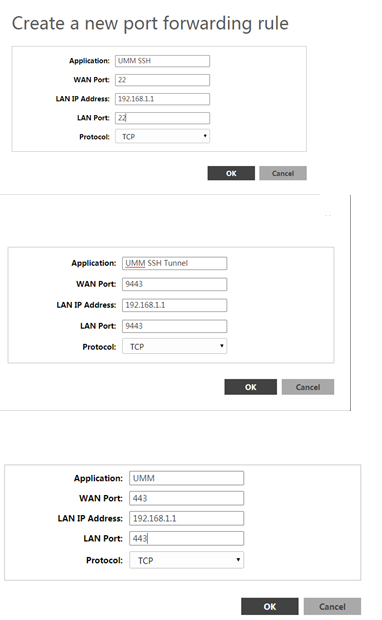
By default, Unleashed Multi-Site Manager uses port 9443 and 22 to bring up the SSH tunnel. Ensure you allow these ports on your firewall and map them to the Unleashed Multi-Site Manager server on your NAT server.
If Unleashed Multi-Site Manager is managing ICX switches, ports 443 and 22 are used to bring up the SSH Tunnel. These ports are not configurable on the switch, so ensure the ports are mapped to Unleashed Multi-Site Manager on the NAT server.
- Create port forwarding rules: TCP: UMM IP: 9443, TCP: UMM IP: 443 and TCP: UMM IP: 22