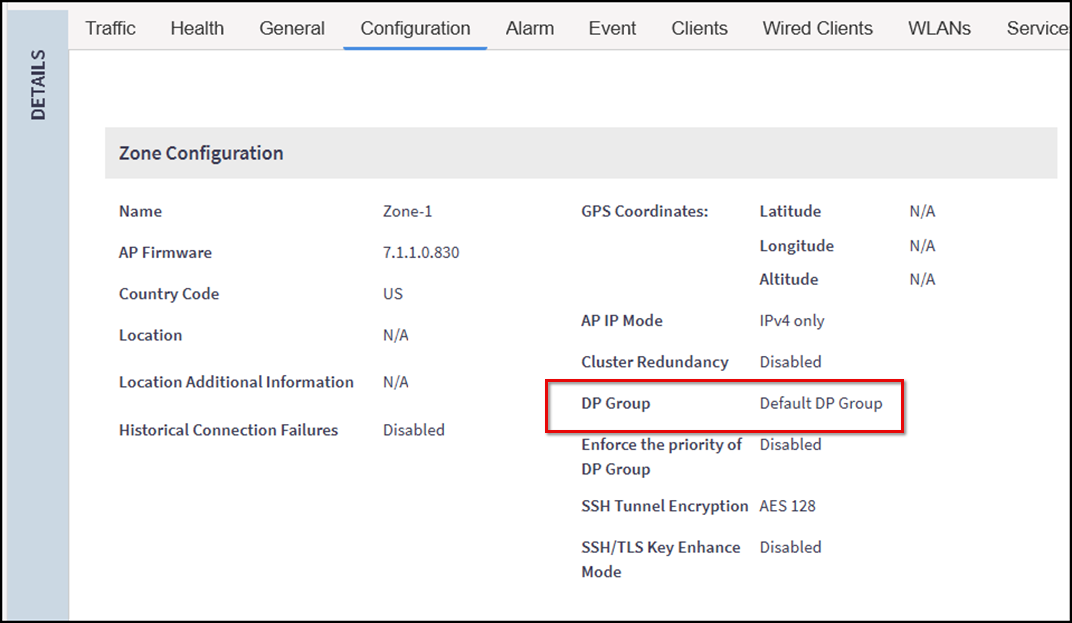
Verifying the Data Plane Group Configured to a Zone
Verify which Data Plane Group is
currently assigned to a Zone to ensure Access Points in the Zone are using the intended
Data
Planes for tunnel establishment and traffic forwarding.
Note: For verifying low-level details of the AP-to-Data Plane
connection, use the AP CLI; refer to RUCKUS AP Tunnel Stats.
- In the controller web UI, select to open the Access Points page.
- Select the desired Zone from the list and scroll to the Details section.
- Under the Configuration tab, in Zone Configuration,
review the DP Group
field.You have verified the Data Plane Group assigned to the Zone, ensuring Access Points in the Zone will use the correct Data Planes for tunnel establishment.