Overview of ICX Switch Management
SmartZone ICX-Management supports the following ICX switch activities:
- Registration and authentication
- Switch inventory (for example, model, firmware version, and last backup)
- Health and performance monitoring (for example, status, traffic statistics, errors, and clients) with alarms
- Zero-touch provisioning
- Configuration changes
- Port settings
- Configuration copy
- Configuration file backup and restore
- Firmware upgrade
- Client troubleshooting
- Remote Ping and Traceroute
Preparing ICX Devices to be Managed by SmartZone
ICX devices running either router or switch images can be managed by SmartZone. The following items are required to manage ICX devices:
- Refer to the ICX-Management Feature Support Matrix for detailed information on software compatibility requirements and feature availability.
- The Smartzone IP address must be reachable by the ICX device through the Management interface or through switch or router interfaces.
- The ICX device must be made aware of the configured
SmartZone IP address in one of the following ways:
- Configure the DHCP server to use DHCP option 43.
- Issue the following command
at the global configuration level:
ICX(conf)# manager active-list < SmartZone_Control_IP_Address >
- Add an entry in the DNS server with the hostname ruckuscontroller or ruckuscontroller.<local domain> that points to the SmartZone IP address.
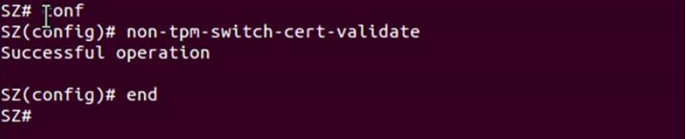
- On some ICX 7250, ICX 7450, or ICX 7750 devices, self-signed certificates are used.
SmartZone honors these certificates when the
non-tpm-switch-cert-validatecommand is entered on the SmartZone console as shown in the following example.Note: ICX 7150, ICX 7650, and ICX 7850 devices are shipped with embedded certificates that are used for authentication with SmartZone. - When SmartZone or ICX devices are behind NAT, be sure to forward TCP ports 443 and 22 through NAT.
- The following table lists virtual platform requirements for supporting ICX devices.
Note: Each unit in a stack is considered a separate switch unit for capacity management purposes.
Virtual Platform Requirements for Supporting ICX Devices
Platform Maximum Number of Switches Per Node RAM vCPU Disk Storage vSZ-E 200 18 GB 4 100 GB vSZ-H 2000 30 GB 12 300 GB The scaling limits in the table apply to switch-only deployments. For a mix of APs and switches, the scaling limits vary accordingly. SmartZone supports a 5-to-1 AP-to-switch ratio.
Example 1: vSZ-E supports up to 1,000 APs on a single node. If 200 APs are currently managed by SmartZone, there is room for 800 more APs or 160 ICX switches (800 divided by 5).
Example 2: vSZ-H supports up to 2,000 ICX switches on a single node. If 500 switches are currently managed, there is room for 1,500 more switches, or 7500 APs (1500 multiplied by 5).