Configuration Example: Single-Hop Session for One Member Link for a LAG
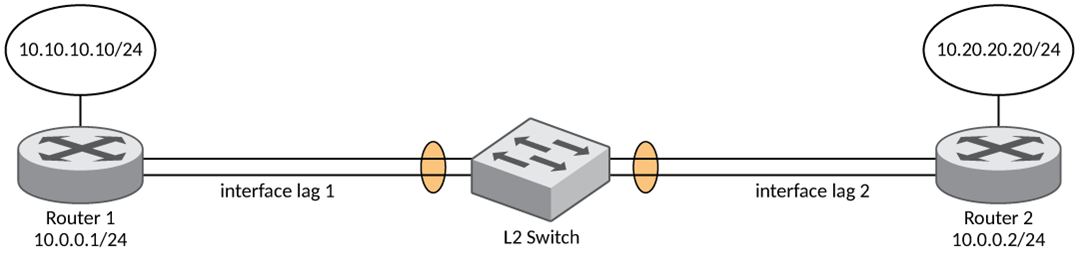
The following configuration example configures a single-hop static BFD session for one member link for a LAG interface, as illustrated in the preceding figure. Only one BFD session is configured for the LAG on one of its member links. Router 2 is configured as active and will, therefore, self-initiate the sending of BFD packets on one of its member links. BFD passive mode is configured for Router 1, which means that Router 1 will bootstrap the BFD session only over the member link on which it receives BFD packets from Router 2.
Router1# configure terminal
Router1(config)# interface lag 1
Router1(config-lag-if-lg1)# ip address 10.0.0.1/24
Router1(config-lag-if-lg1)# exit
Router1(config)# ip route 10.20.20.20/24 10.0.0.2 bfd
Router1(config)# ip route bfd 10.0.0.2 passive
Router1(config)# ip route bfd 10.0.0.2 min-tx 300 min-rx 290 multiplier

Router2# configure terminal
Router2(config)# interface lag 2
Router2(config-lag-if-lg2)# ip address 10.0.0.2/24
Router2(config-lag-if-lg2)# exit
Router2(config)# ip route 10.10.10.10/24 10.0.0.1 bfd
Router2(config)# ip route bfd 10.0.0.1
Router2(config)# ip route bfd 10.0.0.1 min-tx 290 min-rx 300 multiplier 3
For more information and configuration examples for BFD for IP static routes, refer to BFD for Static Routes.