Topologies Handled by Zero-touch or SPX Interactive-setup
Certain topologies can be discovered and automatically configured in an SPX (Campus Fabric) domain by the zero-touch utility. These valid topologies, among others, can also be handled by the SPX interactive-setup utility, which allows the user to determine which units to include in the Campus Fabric domain and what IDs they will be assigned. In addition to the set of valid topologies, the interactive-setup utility handles a broad range of topologies that can be modified by user selections to become valid.
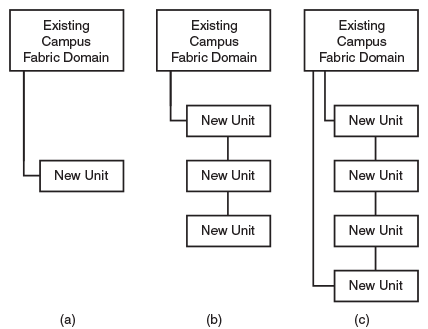
In a valid topology, all discovered units and links can join an existing Campus Fabric domain to form a supported Campus Fabric topology. All new links can be formed automatically into a chain or ring with the zero-touch utility.
For a group of connected new units to be detected by the Campus Fabric domain, the following conditions must be met:
- The new units must be clean units connected through non-base module ports (that is, through modules 2, 3, or 4).
- At least one new unit must have a non-base module port linking to the Campus Fabric domain through SPX probe ports.
SPX probe ports may be any of the following:
- Configured
zero-touch-ports(configured as described in Using zero-touch to add PE units) - CB SPX ports or SPX LAGs that are not live and that are not attached to existing PE units
- A downstream SPX port or SPX LAG on an edge PE unit (including those formed from either base-module or non-base-module ports)
- All non-base module ports of an edge PE.
SPX probes for new units cannot be sent over the following ports:
- Live SPX ports or SPX LAGs (whether the live ports are on a CB or PE unit)
- Any port that contains configuration.
The following figure depicts valid topologies that can be handled by the zero-touch utility.