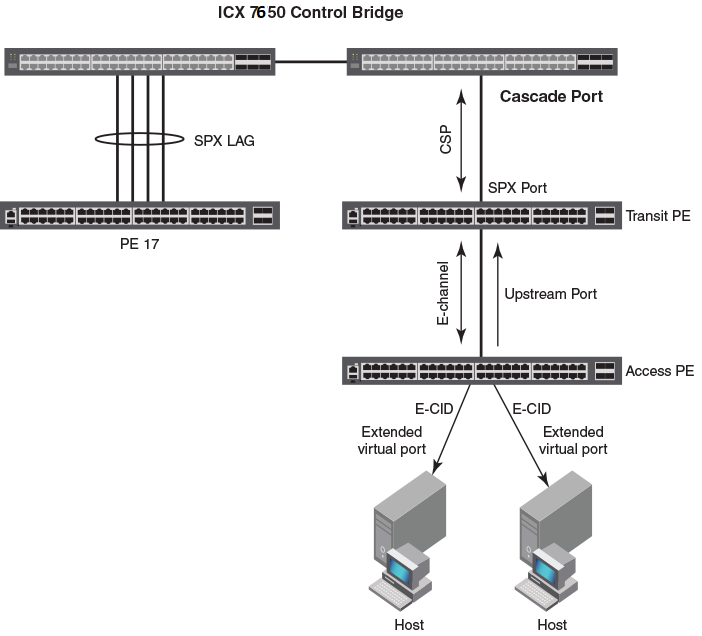
| access (or base) port extender
|
A port extender (PE) connecting to end hosts. An access PE is located at the end
of the CB-PE tree.
|
| cascade port
|
An egress CB port connecting to a PE. (The link between the cascade port and the
PE port is configured and displayed as an SPX port or SPX LAG.)
|
| CB port
|
A control bridge (CB) port on a standalone or a stacking system. A CB port can be
on any device in a stacking system.
|
| control bridge
|
The control bridge (CB) has ports that link to one or more port extender (PE) units.
The CB handles traffic to and from PE ports as if these ports were local ports. The
control bridge can consist of an ICX 7650, ICX 7750, or ICX 7850 standalone or stack.
|
| clean unit
|
A clean unit is a device running switch/router mode that has no startup_config flash
during bootup and currently has no startup_config. (That is, the
write memory command has never been executed on the unit.) You can execute the
erase startup command followed by the
reload command without executing the
write memory command to make a unit to a new unit.
A clean unit does not have a password. A clean unit must not contain
stack enable or
spx cb-enable configuration.
|
| CSP
|
Control and Status Protocol. CSP serves as the Campus Fabric communication protocol
between the CB master and the PE units in its control plane.
|
| downstream port
|
A PE port that transmits traffic away from the CB, toward the access PE. A downstream
port is an "egress" port from the perspective of the CB.
|
| E-channel
|
The bidirectional path between the external extended port and the corresponding internal
extended port. Each E-channel is identified by an E-channel ID (E-CID) in the E-tag
(ranges from 0x0001 to 0x3FFF). E-channels can be point-to-point, point-to-multipoint,
or multipoint-to-point.
|
| E-CID
|
E-channel identifier. An E-CID identifies the PE destination port in CSP.
|
| E-tag
|
A tag added to SPX packets. The E-tag contains an E-CID.
|
| extended port
|
A PE port that serves as an access port to a host. Internal extended ports provide
connectivity to the ports of the C-VLAN component. External extended ports operate
as ports of the extended bridge. Each internal extended port is linked through an
E-channel to an external extended port. Additional E-channels provide linkage between
an internal extended port and multiple external extended ports in support of multicast
frame delivery.
|
| LLDP
|
Link Level Discovery Protocol. LLDP is the Layer 2 protocol used by the CB to discover
and connect to PEs.
|
| master (active controller)
|
The master of a CB stack. The entire stack is considered one logical device.
|
| ME-CID
|
Multicast E-channel Identifier. Inserted in the E-tag, it carries a value of 0x1000
to 0x3FFF to indicate a multicast channel.
|
| PE
|
Port extender. A PE, or PE unit, is a dummy device that contains multiple ports (for
example, 24 or 48 ports). A PE forwards all traffic to the connected control bridge
(CB). The PE does not perform local switching. The PE can connect to any unit in the
CB.
|
| PE mode
|
A special bootup role that causes a unit to perform as a dummy device. A unit in PE
mode does not parse startup_config flash during bootup. It runs protocols, such as
LLDP, only available to a PE. In PE mode, the unit does not perform local switching.
Most commands and configurations are blocked.
|
| Provisional-PE mode
|
A temporary mode created when a user configures the
spx pe-enable command on a unit but has not yet reloaded the unit. Because the unit previously
booted up in regular mode, it continues to perform as a regular device until the next
reload. That is, the unit still acts like a regular switch or router. Most commands
and configurations are blocked the same way as in PE mode.
|
| regular mode
|
Normal or non-SPX mode. Regular mode describes a standalone unit that behaves like
a normal switch or router.
|
| reserved configuration
|
An SPX unit or stack unit that is configured and appears in output for the
show running-config command, but which does not physically exist.
|
| SPX
|
Switch Port Extender. SPX capability, also known as Campus Fabric, is based on IEEE
802.1BR standards and recommendations.
|
| SPX port
|
A port on a PE that links to the CB or another PE. SPX port is a general term for
PE ports and cascade ports. The
spx-port command is used in CLI configuration to configure either a cascade port or an SPX
port.
|
| SPX LAG
|
A trunk that contains at least two SPX ports. (Cascade ports may be included in an
SPX LAG.)
|
| standalone
|
An individual unit that is not part of a stacking system. A standalone ICX 7650, ICX
7750, or ICX 7850 (or stack) can be enabled as an 802.1br control bridge.
|
| TLV
|
Type-Length-Value information. CSP packets consist of a command TLV and can contain
additional TLVs.
|
| transit PE
|
A PE that is not an access PE. A transit PE aggregates transmissions from downstream
PEs.
|
| upstream port
|
A PE port that connects to a transit PE toward the CB or directly to the CB. An upstream
port is an "ingress" port from the perspective of the CB.
|