SPX LAG Splits and Merges
Both the zero-touch utility and the SPX interactive-setup utility can split or merge CB and PE SPX ports and LAGs to match discovered new topology. When SPX LAGs split or merge, some ports are disabled. The zero-touch and SPX interactive-setup utilities re-enable ports that become SPX ports and SPX LAGs. Ports that become data ports remain disabled.
no disable command. For example:
device# configure terminal
device(config)# interface 17/2/1
device(config-17/2/1)# no disable
Ports of Different Speeds
All ports in a LAG must have the same speed. When the zero-touch utility or the interactive-setup utility encounters ports with different speeds, it assigns them to different SPX ports or LAGs.
Here are some examples of how the system forms SPX connections from ports running at different speeds.
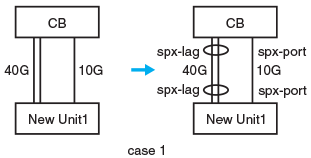
In the previous example, a ring of only one PE is formed because all links are classified in two directions due to their different speeds. Because a single PE ring is an invalid topology, the system prints and logs a warning message. The new unit is not converted to a PE.
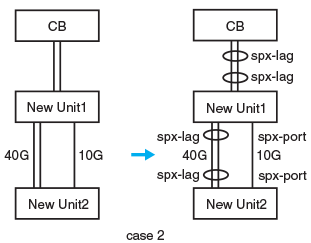
The previous figure forms an invalid topology. The zero-touch utility issues a warning when the topology is formed. The SPX interactive utility allows you to remove the 10-Gbps links or the 40-Gbps links. The two new units form a ring with one uplink. This is an example of Case 1 in Special cases where a link can be removed to select all new units.