Adding SmartCell Insight
SmartCell Insight (SCI) is a big data
analytics and reporting platform that enables efficient management of wireless networks.
SCI
provides visibility into network performance, operation, and planning of RUCKUS
wireless networks. RUCKUS Network Director provides the
option to add RUCKUS SCIs installed in the network and also monitor SCI status from the RUCKUS Network Director Admin portal.
Complete the following steps to add a SCI cluster.
- On the menu, click
Service.
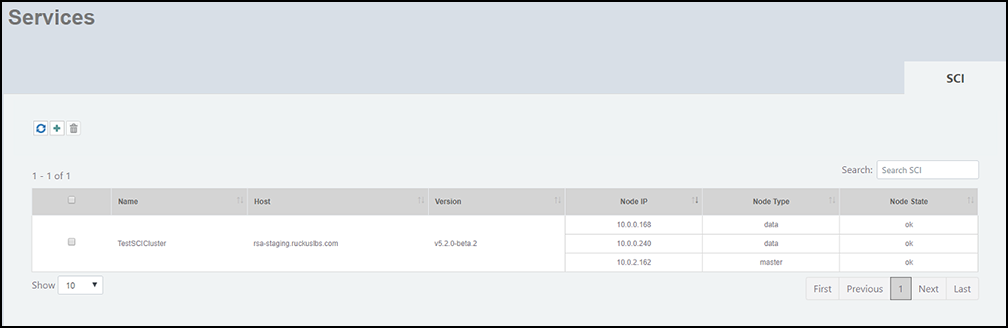
The Services window is displayed.
SCI Details
Field Description Name Displays the name of the SCI. Host Displays the host name of the SCI. You can click the host name to access the SCI. The single sign-on capability is enabled to access the SCI. This allows the user to access SCI without having to type in password when launching a connection to SCI. The user should have the Super Admin privileges to access SCI. Version Displays the SCI version. Node IP The IP address of the node Node Type The type of node. There are two types of nodes, namely master and data nodes. Node State The node state is green when in use and red when disconnected and not in use. Note: The columns in the Services window can be resized to meet your requirements. - In the SCI tab, click
the
 icon to add SCI.
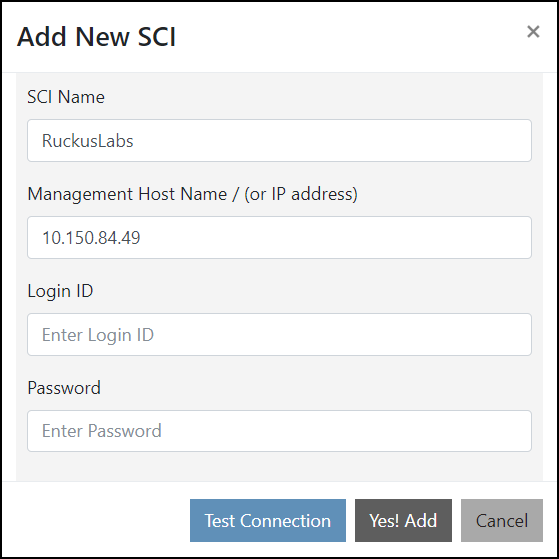
- Complete the following fields to add a cluster.
- Click
Yes! Add to add the SCI to the
RUCKUS Network Director.
An information dialog box is displayed indicating that the SCI is successfully added.
- Click Ok to complete the action.