Adding SPoT
Ruckus SmartPositioning Technology (SPoT) is a cloud-based Smart Wi-Fi location-based
services (LBS) user positioning technology suite that gives both carriers/service
providers and enterprises the ability to deliver a wide-range of value added services
that can help them increase their profitability while enhancing users’ online experiences.
It uses Ruckus Controllers and Access Points to provide customers with location intelligence
for purposes such as Location Analytics, Marketing, Operations planning and so on.
RUCKUS Network Director provides the option to add Ruckus SPoT service installed in the network and also
monitor SPoT status from the
RUCKUS Network Director admin portal.
Complete the following steps to add SPoT service.
- On the menu, click
Service.
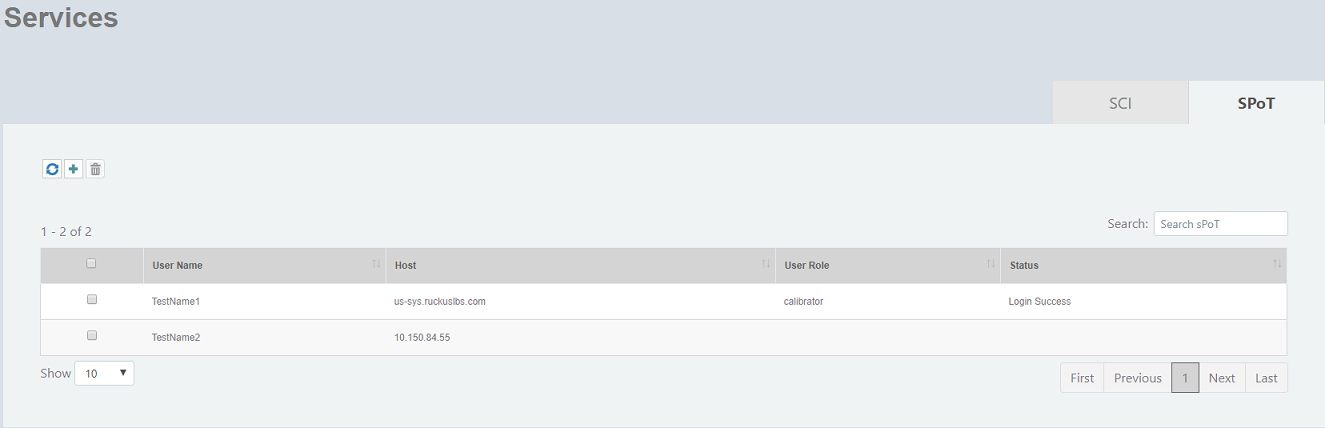
The Services window is displayed.
SPoT details
Field Description User Name Displays the name of the user. Host Displays the host name of the SPoT. User Role Displays the role of the user - Admin, Calibrator or Consumer. Admin accounts have full privileges, Calibrator accounts have calibration and viewing privileges, and Consumer accounts are restricted to viewing the SPoT Analytics report pages. Status Displays the status of the connection. - In the
SPoT tab, click
 to add SPoT.
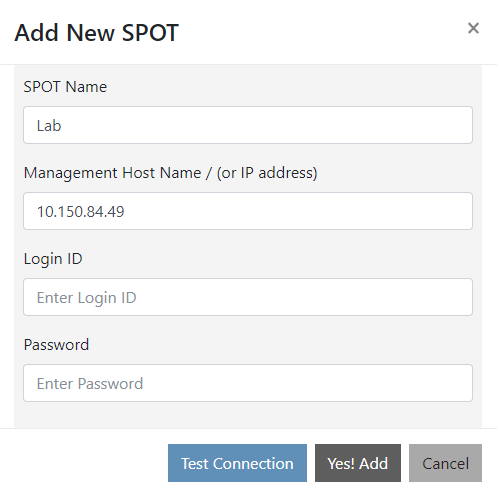
- Complete the following fields to add SPoT.
- Click
Yes! Add to add the SPoT to the
RUCKUS Network Director.
An information dialog box is displayed indicating that the SPoT is successfully added.
- Click Ok to complete the action.