RUCKUS One Licensing Compliance
The Compliance page offers a detailed overview of the RUCKUS One licenses that are allocated, utilized, and available for networking devices.
License Compliance for RUCKUS One End Customers
To view the RUCKUS One End Customers (REC) license compliance for networking devices, navigate the main menu, selecting , then click the Compliance tab.
The Compliance page is displayed.
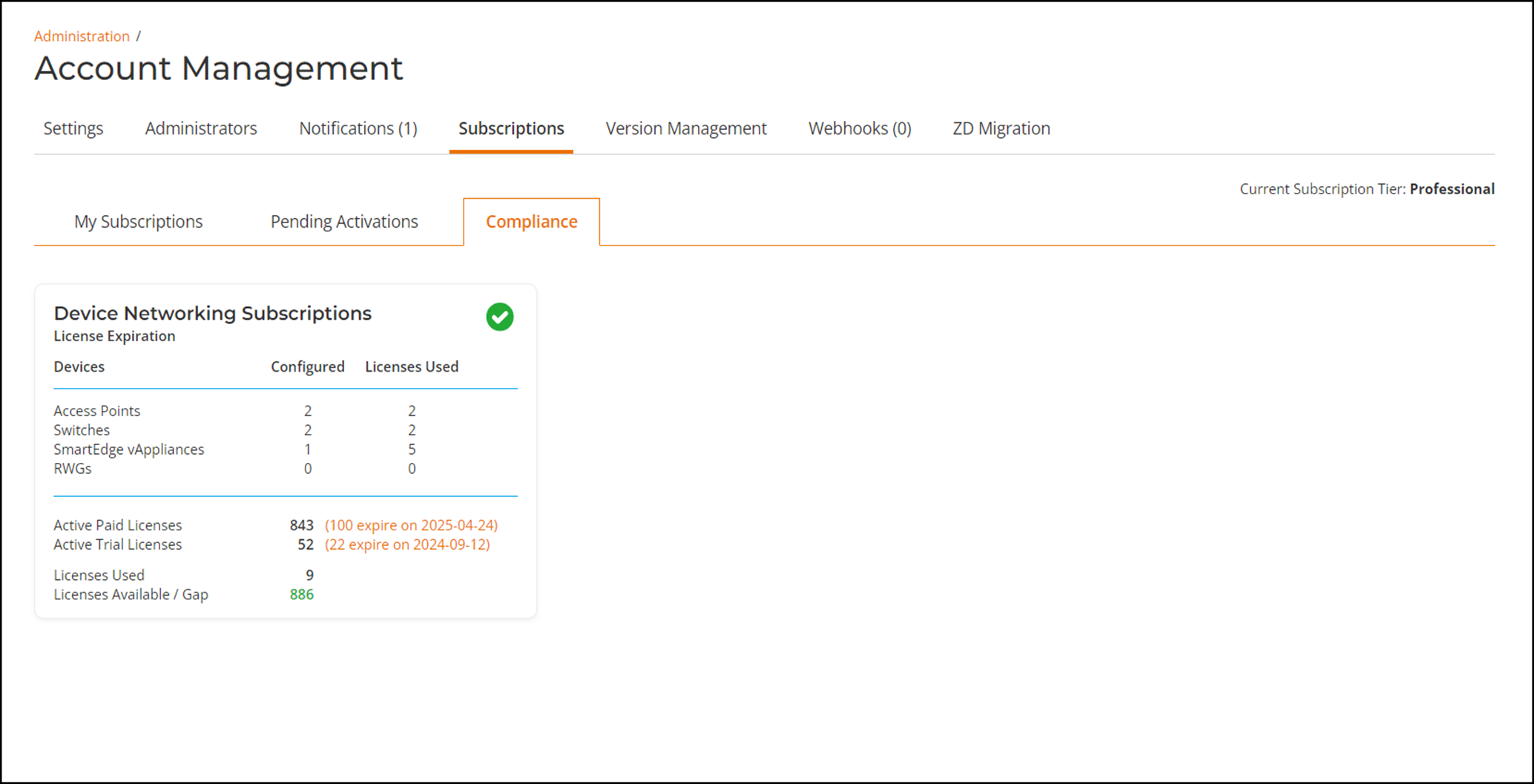
On the Compliance page, the Device Networking Subscriptions tile displays license utilization, allocation, and availability details for your networking devices. The tile contains a visual indicator; a green check means licenses are still available, a red exclamation mark indicates there is a shortage of licenses. The tile also contains the following licensing details:
- Devices: Devices supported by RUCKUS One licenses. For example: Access Points, Switches, SmartEdge vAppliances, and RWGs.
- Configured: The number of configured devices, per device type, configured in RUCKUS One.
- Licenses Used: The number of RUCKUS One licenses used by each device type.
- Active Paid Licenses: The number of RUCKUS One licenses which were purchased and are effective, along with the license count expected to expire soon and the date of expiry.
- Active Trial Licenses: The number of RUCKUS One trial licenses purchased which are effective, along with the license count expected to expire soon and the date of expiry.
- Licenses Used: The total number of licenses used by all the devices, which includes paid and trial licenses.
- Licenses Available / Gap: The difference between the number of licenses purchased and the number of licenses used. A positive number in green indicates available licenses, including both paid and trial. A negative number, such as -11 in red, indicates a shortage of licenses.
Compliance for RUCKUS One Managed Service Providers
To view the RUCKUS One Managed Service Providers (MSP) license compliance for networking devices,on the main menu, select Subscriptions, then click the Compliance tab.
The Compliance page is displayed.
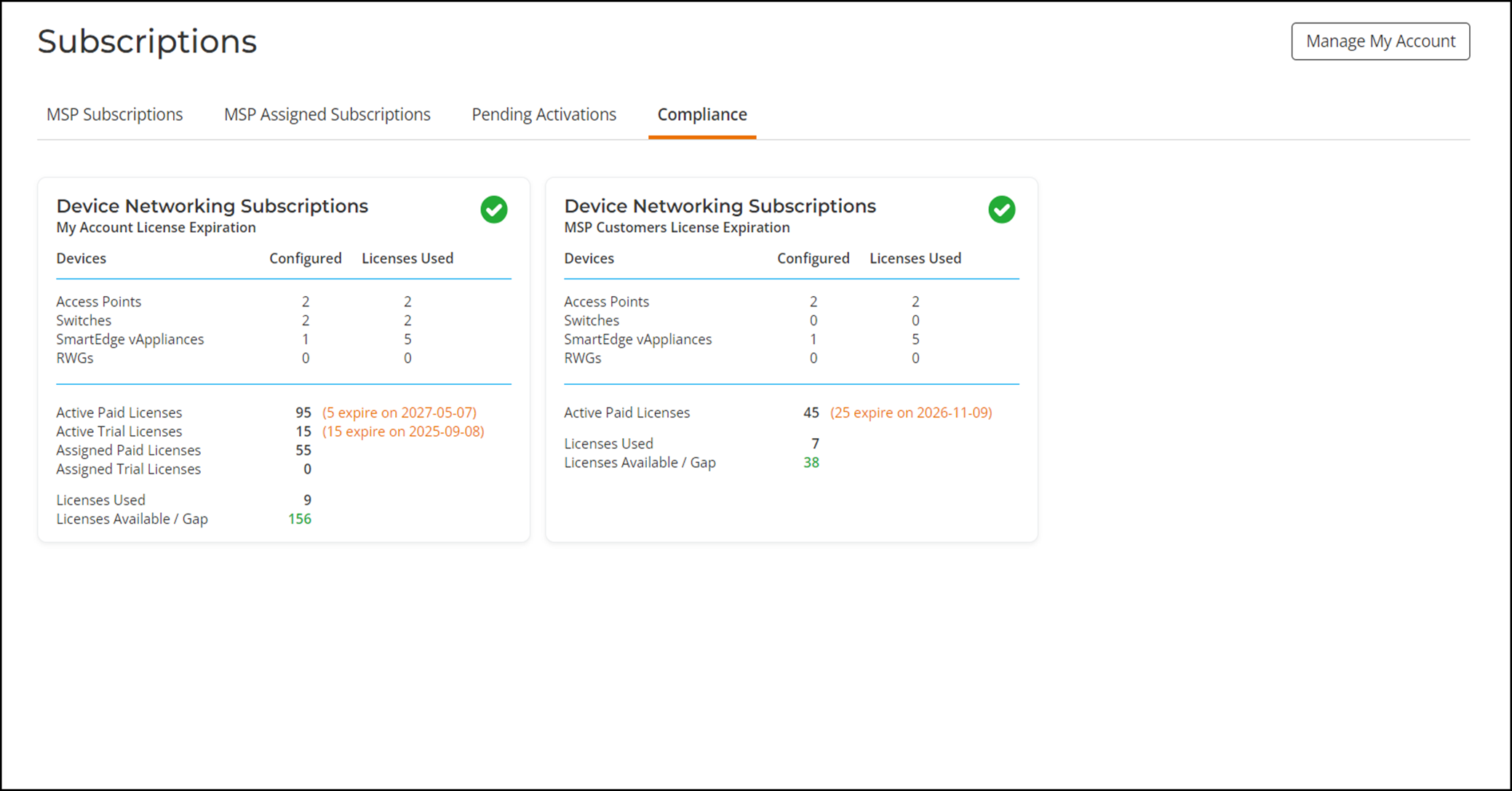
On the Compliance page, the Device Networking Subscriptions tiles display license utilization, allocation, and availability details for the account types under MSP purview. Each tile contains a visual indicator; a green check means licenses are still available, a red exclamation mark indicates there is a shortage of licenses. The tiles also contain the following licensing details:
My Account License Expiration (the MSP's own account)
- Devices: Devices supported by RUCKUS One licenses. For example: Access Points, Switches, SmartEdge vAppliances, and RWGs.
- Configured: The number of configured devices, per device type, configured in RUCKUS One.
- Licenses Used: The number of RUCKUS One licenses used by each device type.
- Active Paid Licenses: The number of RUCKUS One licenses which were purchased and are effective, along with the license count expected to expire soon and the date of expiry.
- Active Trial Licenses: The number of RUCKUS One trial licenses purchased by the MSP which are effective, along with the license count expected to expire soon and the date of expiry.
- Assigned Paid Licenses: The number of RUCKUS One purchased license assigned to the MSP's own account.
- Assigned Trial Licenses: The number of RUCKUS One trial licenses assigned to the MSP's own account.
- Licenses Used: The total number of licenses used by all the devices, which includes paid, trial, and assigned licenses.
- Licenses Available / Gap: The difference between the number of licenses purchased and the number of licenses used. A positive number in green indicates available licenses, including both paid and trial. A negative number, such as -11 in red, indicates a shortage of licenses.
MSP Customers License Expiration
- Devices: Devices supported by RUCKUS One licenses. For example: Access Points, Switches, SmartEdge vAppliances, and RWGs.
- Configured: The number of configured devices, per device type, configured in RUCKUS One.
- Licenses Used: The number of RUCKUS One licenses used by each device type.
- Active Paid Licenses: The number of RUCKUS One licenses which were purchased and are effective, along with the license count expected to expire soon and the date of expiry.
- Licenses Used: The total number of licenses used by all the devices, which includes paid and trial licenses.
- Licenses Available / Gap: The difference between the number of licenses purchased and the number of licenses used. A positive number in green indicates available licenses, including both paid and trial. A negative number, such as -11 in red, indicates a shortage of licenses.