Viewing the Site Admin Details
If you select a Domain name from the Site Admins tab, it will show the Site Admin details, including the email ID, name, status, assigned networks, and last login time.
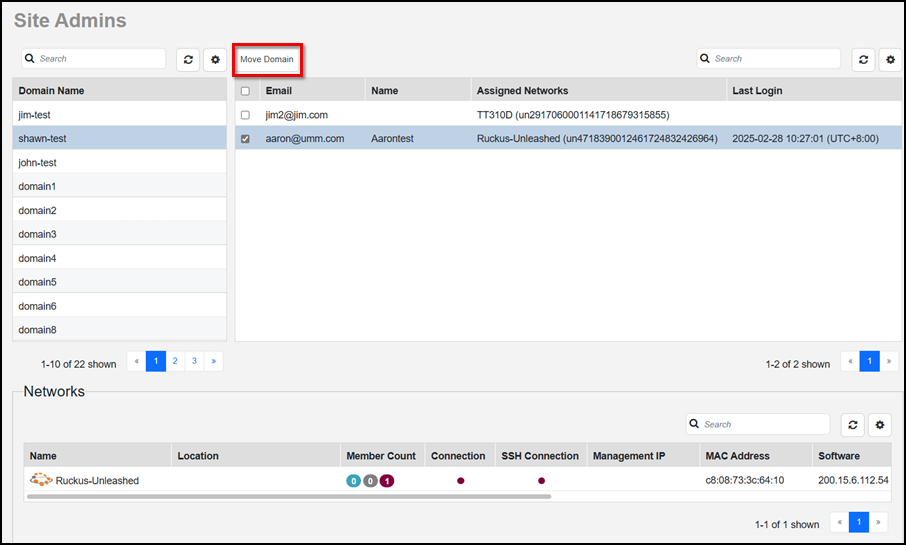
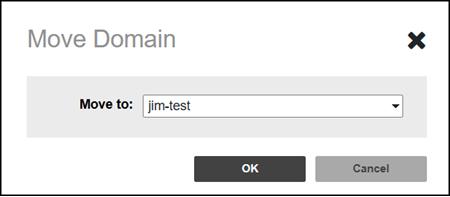
Click the checkbox for a specific Site Admin and click Move Domain to transfer a Site Admin between Domains. Select from any of the Domain names in the drop-down list displayed in the Move Domain pop-up window, then click OK.
Click the  icon
(available above each table on the Site Admins page) to select
and deselect the contents of the table, select the number of rows to show, and manage
the Search function criteria. Refer to Managed
Networks for more information about the fields and table columns that appear
by default in the Networks table.
icon
(available above each table on the Site Admins page) to select
and deselect the contents of the table, select the number of rows to show, and manage
the Search function criteria. Refer to Managed
Networks for more information about the fields and table columns that appear
by default in the Networks table.