Navigating the Brand Admin Portal

The Brand Administrator is authorized to create, edit, and delete domain groups and domain administrators, ensuring strong management and control over the domain environment.

GUI Elements

List of GUI Elements

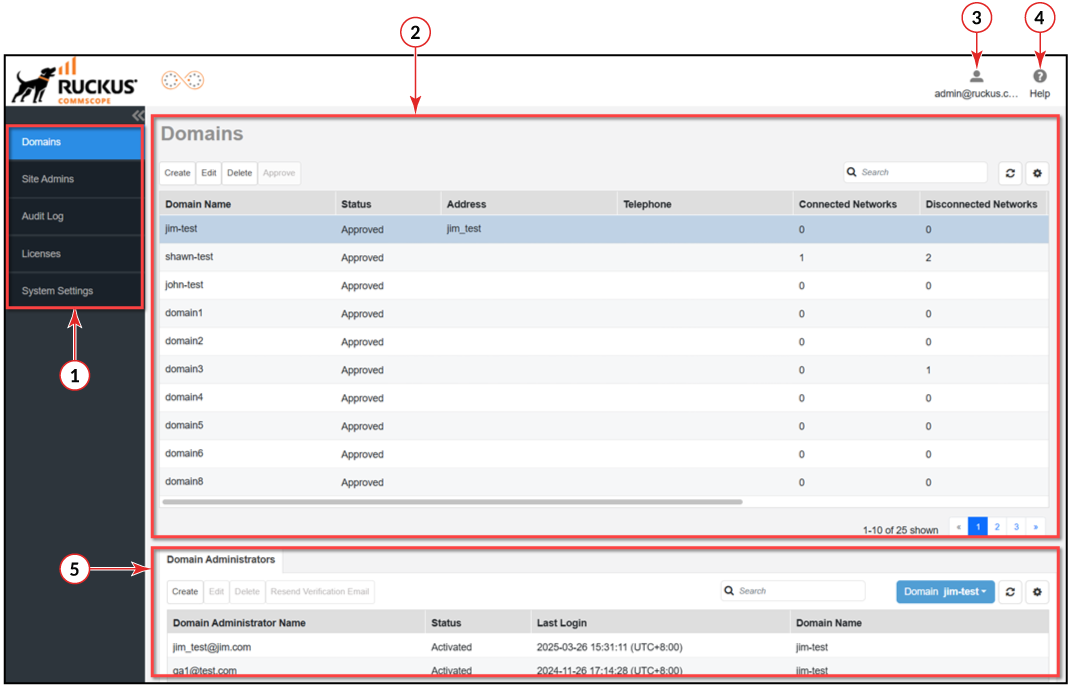
Number Name Description
1 Main menu Use the navigation bar to navigate through the main pages of the portal, which include:
  • Domains
  • Site Admins
  • Audit Log
  • Licenses
  • System Settings
2 Content area When you click an item on the navigation bar, the related information displays in the content area.
3 (Account) Allows you to change the password, language, time zone, and to log out of the Brand Admin portal.

Displays the email address of the Brand Admin. When clicked, a menu displays the following options:

  • Change Password: Opens the Update Password page.
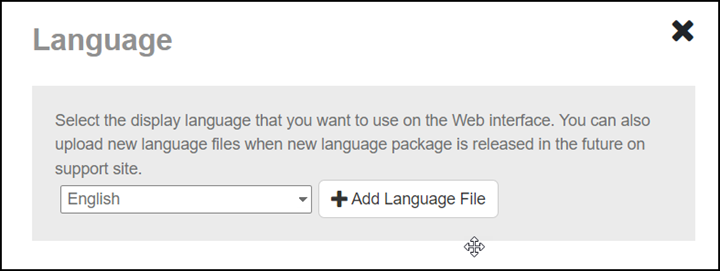
  • Language: Select any language provided in the system settings to be displayed on the web interface. The following languages are installed by default: English, Chinese Simplified, and Chinese Traditional. Alternatively, you may add your own language file.
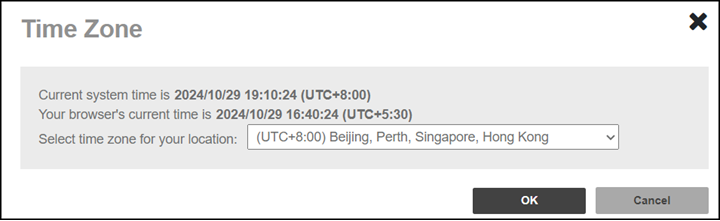
  • Time Zone: Displays the current time for the RMS for Unleashed system as well as for your browser. Here, you can select the time zone for your location.
  • Log Out: Logs you out from RUCKUS Remote Management Services for Unleashed.
4 (Help) Click to view the complete online documentation for RUCKUS Remote Management Services for Unleashed.
5 Domain Administrators Displays the details about the Domain Admins associated with a specific Domain.