Viewing the Domain Administrator

On the Domains page, you can view details about the Domain Admins associated with a specific Domain.
Note: A Domain name can be managed by several Domain administrators.

Viewing the Domain Administrator

  1. Log in to the Brand Admin web interface. The Domain page appears, listing all the Domains managed by Remote Management Services for Unleashed.
  2. Select the desired Domain Administrator table entry, then.
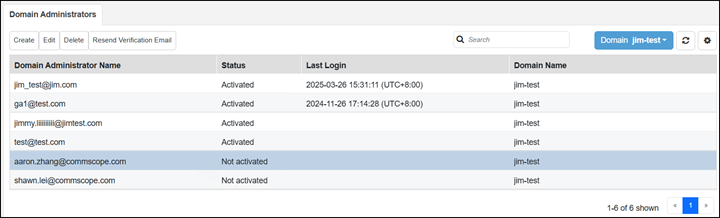
    The Domain Administrators information tab displays information about the Domain Admin name, status, last login, and the related Domain name.
    • To create a new Domain Admin, click Create.
    • To change the password, click Edit.
    • To delete a Domain Admin, click Delete.
    • To resend the verification email for a Domain Admin, click Resend Verification Email.