Enabling MSTP on a Device
You must enable MSTP on the device.
MSTP scope must be enabled on the switch as described in Configuring MSTP Mode and Scope before MSTP can be enabled.
To enable MSTP on your switch, use the following at the Global Configuration level.
device(config)# mstp start
Examples of an MSTP configuration
In the following figure, four RUCKUS device routers are configured in two regions. There are four VLANs in four instances in Region 2. Region 1 is in the CIST.
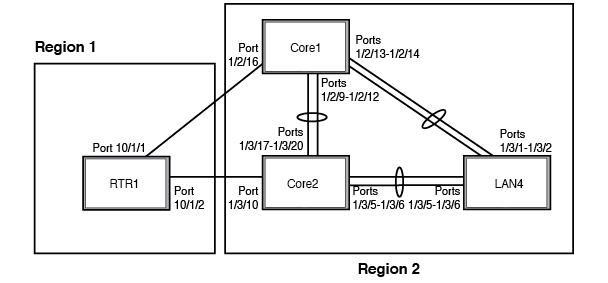
RTR1 on MSTP Configuration
device(config-vlan-4093)# tagged ethernet 10/1/1 to 10/1/2
device(config-vlan-4093)# exit
device(config)# mstp scope all
device(config)# mstp name Reg1
device(config)# mstp revision 1
device(config)# mstp admin-pt2pt-mac ethernet 10/1/1 to 10/1/2
device(config)# mstp start
device(config)# hostname RTR1
Core 1 on MSTP Configuration
device(config)# trunk ethernet 1/2/9 to 1/2/12 ethernet 1/2/13 to 1/2/14
device(config-vlan-1)# name DEFAULT-VLAN by port
device(config-vlan-1)# exit
device(config)# vlan 20 by port
device(config-vlan-20)# tagged ethernet 1/2/9 to 1/2/14 ethernet 1/2/16
device(config-vlan-20)# exit
device(config)# vlan 21 by port
device(config-vlan-21)# tagged ethernet 1/2/9 to 1/2/14 ethernet 1/2/16
device(config-vlan-21)# exit
device(config)# vlan 22 by port
device(config-vlan-22)# tagged ethernet 1/2/9 to 1/2/14 ethernet 1/2/16
device(config-vlan-22)# exit
device(config)# vlan 23 by port
device(config)# mstp scope all
device(config)# mstp name HR
device(config)# mstp revision 2
device(config)# mstp instance 20 vlan 20
device(config)# mstp instance 21 vlan 21
device(config)# mstp instance 22 vlan 22
device(config)# mstp instance 0 priority 8192
device(config)# mstp admin-pt2pt-mac ethernet 1/2/9 to 1/2/14
device(config)# mstp admin-pt2pt-mac ethernet 1/2/16
device(config)# mstp disable ethernet 2/240.
device(config)# mstp start
device(config)# hostname CORE1
Core2 on MSTP Configuration
device(config)# trunk ethernet 1/3/5 to 1/3/6 ethernet 1/3/17 to 1/3/20
device(config)# vlan 1 name DEFAULT-VLAN by port
device(config-vlan-1)# exit
device(config)# vlan 20 by port
device(config-vlan-20)# tagged ethernet 1/3/5 to 1/3/6 ethernet 1/3/17 to 1/3/20
device(config-vlan-20)# exit
device(config)# vlan 21 by port
device(config-vlan-21)# tagged ethernet 1/3/5 to 1/3/6 ethernet 1/3/17 to 1/3/20
device(config-vlan-21)# exit
device(config)# vlan 22 by port
device(config-vlan-22)# tagged ethernet 1/3/5 to 1/3/6 ethernet 1/3/17 to 1/3/20
device(config-vlan-22)# exit
device(config)# mstp scope all
device(config)# mstp name HR
device(config)# mstp revision 2
device(config)# mstp instance 20 vlan 20
device(config)# mstp instance 21 vlan 21
device(config)# mstp instance 22 vlan 22
device(config)# mstp admin-pt2pt-mac ethernet 1/3/17 to 1/3/20 ethernet 1/3/5 to 1/3/6
device(config)# mstp admin-pt2pt-mac ethernet 1/3/10
device(config)# mstp disable ethernet 1/3/7 ethernet 1/3/24
device(config)# mstp start
device(config)# hostname CORE2
LAN 4 on MSTP Configuration
device(config)# trunk ethernet 1/3/5 to 1/3/6 ethernet 3/1/1 to 3/1/2
device(config)# vlan 1 name DEFAULT-VLAN by port
device(config-vlan-1)# exit
device(config)# vlan 20 by port
device(config-vlan-20)# tagged ethernet 3/1/1 to 3/1/2 ethernet 3/1/5 to 3/1/6
device(config)# exit
device(config)# vlan 21 by port
device(config-vlan-21)# tagged ethernet 3/1/1 to 3/1/2 ethernet 3/1/5 to 3/1/6
device(config-vlan-21)# exit
device(config)# vlan 22 by port
device(config-vlan-22)# tagged ethernet 3/1/1 to 3/1/2 ethernet 3/1/5 to 3/1/6
device(config)# mstp scope all
device(config)# mstp config name HR
device(config)# mstp revision 2
device(config)# mstp instance 20 vlan 20
device(config)# mstp instance 21 vlan 21
device(config)# mstp instance 22 vlan 22
device(config)# mstp admin-pt2pt-mac ethernet 3/1/5 to 3/1/6 ethernet 3/1/1 to 3/1/2
device(config)# mstp start
device(config)# hostname LAN4