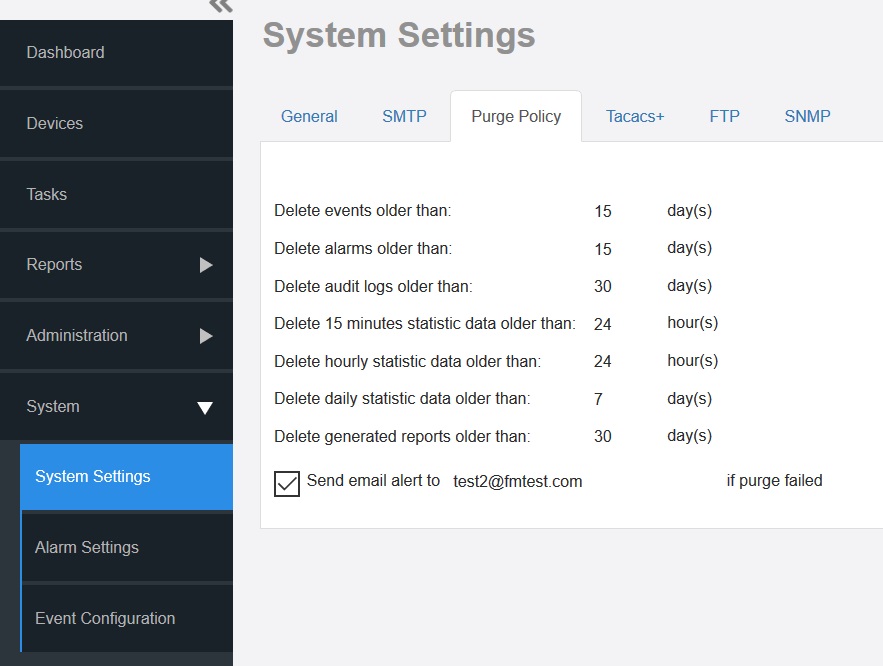
Use Purge Policy to automatically delete the software event logs, audit logs, and
graph data after they age past a certain number of days. This helps ensure that the
software has sufficient disk space to perform tasks.
Go to
Administration > System Settings.
Click Purge
Policy.
Purge Policy Settings
Type a numerical value (all values are number of days) for one or more of the following:
Delete events older than
Delete alarms older than
Delete audit logs older than
Delete 15 minutes statistic data older than
Delete hourly statistic data older than
Delete daily statistic data older than
Delete generated reports older than
Click
Save.
If purge fails, an email notification is
sent to the email address provided.
Note: Lite mode does not
support configure purge policy for the statistic data.