Viewing Beacons
Beacons are signals sent out by IoT
devices that help in identifying and tracking their presence.
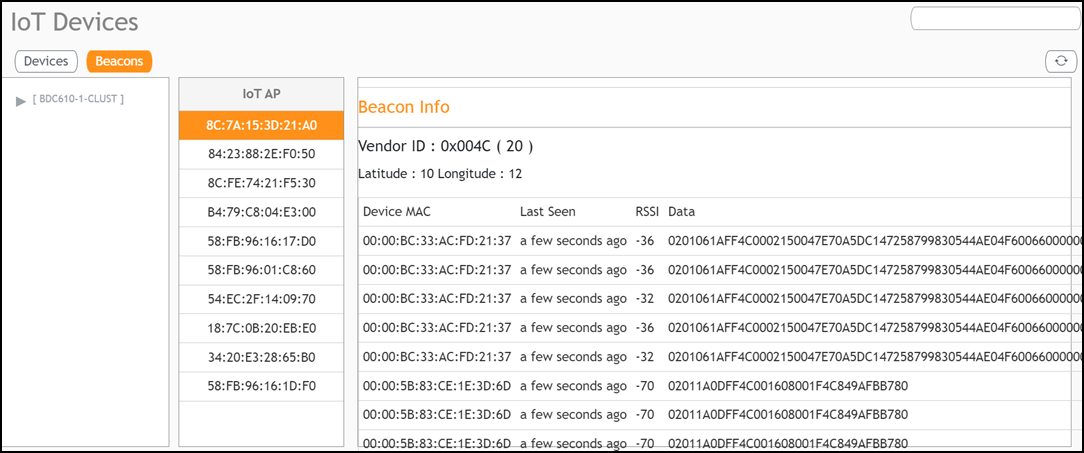
The Beacons page provides an overview of all the beacons detected by the chosen AP, allowing administrators to monitor and manage the devices connected through that specific AP.
- From the main menu, click IoT Devices.
- Click the Beacons tab.
- The various components displayed
on this screen are:
Attention: To view the Beacon info column ensure the Log Level is set to DEBUG.
For more information on Log Level settings, refer to the topic Change the Settings.
- IoT AP: Shows the list of APs with their MAC addresses.
- Beacon Info: Provides the vendor-id and the geographical location of the beacon.
- (Optional) Device Information
Table: This table lists all devices detected by the
selected beacon. The columns typically include:
- (Optional) Device MAC: The unique MAC address of each detected device.
- (Optional) Last Seen: The time since the device was last detected.
- (Optional) RSSI: Received Signal Strength Indicator, which indicates the strength of the received signal from the device. Values are typically negative, with closer to 0 being a stronger signal.
- (Optional) Data: Additional information or identifiers associated with the device, such as its unique identification data.
- Total Beacons: Provides the count of beacons the system is curently tracking.
- Displaying: Click the drop-down list to select the number of beacons you wish to display on the page.
- Pagination Controls: These buttons allow you to navigate through multiple pages of beacons if there are more than the displayed limit.