Client Certificate Template Advanced Options
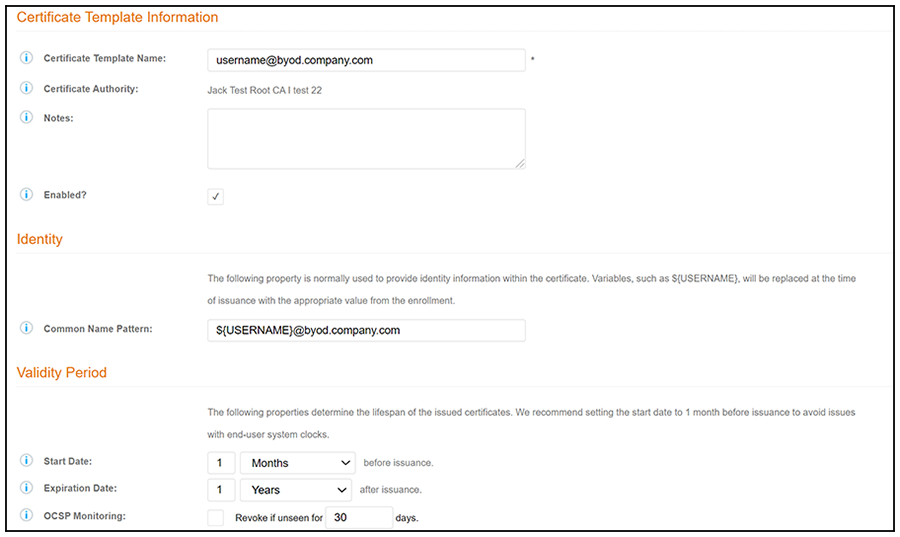
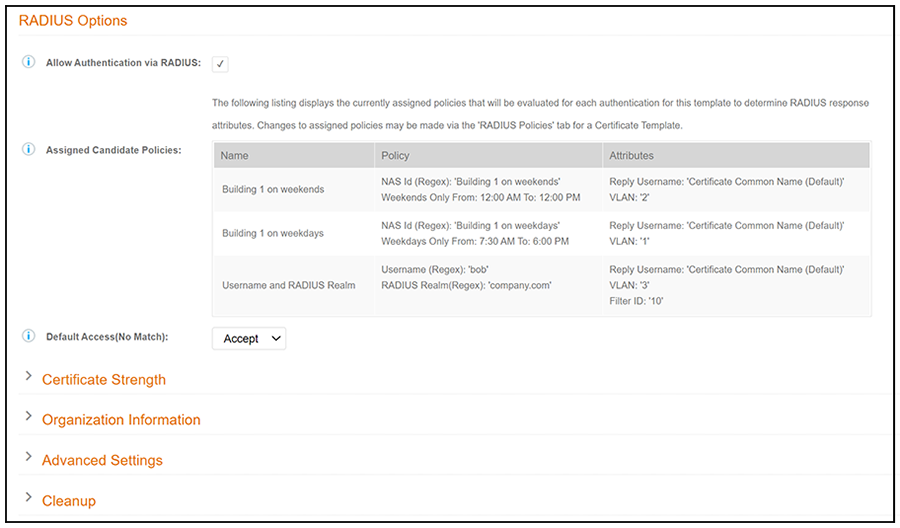
The following table describes the
actions to take for each of the fields on the Modify Certificate Template page,
which
displays if you checked Configure
Advanced Options while creating a client certificate template. The Modify
Certificate Template page is shown below in two screens.
Section updated for 5.8
Fields on the Modify Certificate Template Page
| Field | Action |
|---|---|
| Certificate Template Information | Enter information in the Certificate Template Name and Notes fields. This information is for reference only. Enable the template. |
| Identity | Enter the Common Name Pattern used to determine the common name for certificates generated using the template. Variables, such as ${SERVER_NAME} are replaced when issued with the value from enrollment. |
| Validity Period | Used to determine the lifespan of the issued certificate. |
| RADIUS Options | Used for RADIUS policy information. If no policies have been assigned to this template, you may add policies to an existing template by following the instructions in Adding RADIUS Policies to the NPS Certificate Template. |
| Certificate Strength | Enter the Key Length and Algorithm for certificates using this template. |
| Organization Information | Enter the Patterns for certificates using this template. |
| Advanced Settings | Enter the Patterns for certificates using this template. |
| Cleanup | Use these options to delete client certificate templates and associated data. |
If you are using the NPS as a RADIUS server in your environment, the server certificate requires that you have a SAN Other Name in addition to the Common Name properties. The SAN Other Name Pattern must match the variable used in the Common Name Pattern field.
Nick - Is
this note still ok?