Configuring a Null Route
You can configure a null static route to drop packets to a certain destination. This
is useful when the traffic should not be forwarded if the preferred route is unavailable.
Note: You cannot add a null or interface-based static route to a network if there is already
a static route of any type with the same metric you specify for the null or interface-based
route.
The following figure depicts how a null static route works with a standard route to the same destination.
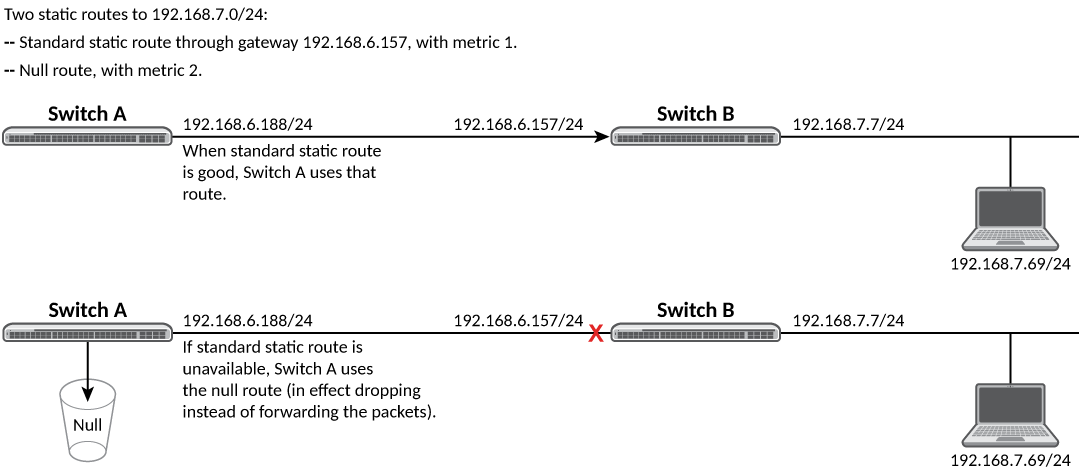
The following procedure creates a preferred route and a null route to the same destination. The null route drops packets when the preferred route is not available.
- Enter global configuration mode.
- Configure the preferred route to a destination.
This example creates a static route to IPv6 2001 : DB8 : : 0/64 destination addresses. These destinations are routed through link-local address fe80::1 and the next hop gateway virtual interface (ve) 3. The route uses the default cost metric of 1.
- Configure the null route to the same destination with a higher metric.
This example creates a null static route to the same destination. The metric is set higher so that the preferred route is used if it is available.
The following example creates a primary route to all 2001 : DB8 : : 0/64 destinations through virtual interface (ve) 3. It creates an alternative null route to drop the packets when the primary route is not available.
device# configure terminal
device(config)# ipv6 route 2001 : DB8 : : 0/64 ve 3 fe80::1
device(config)# ipv6 route 2001 : DB8 : : 0/64 null0 2