Configuring a Null Route
You can configure a null static route to drop packets to a certain destination. This
is useful when the traffic should not be forwarded if the preferred route is unavailable.
The following figure depicts how a null static route works with a standard route to the same destination.
To configure a null route with a lower priority than the preferred route, perform the following steps.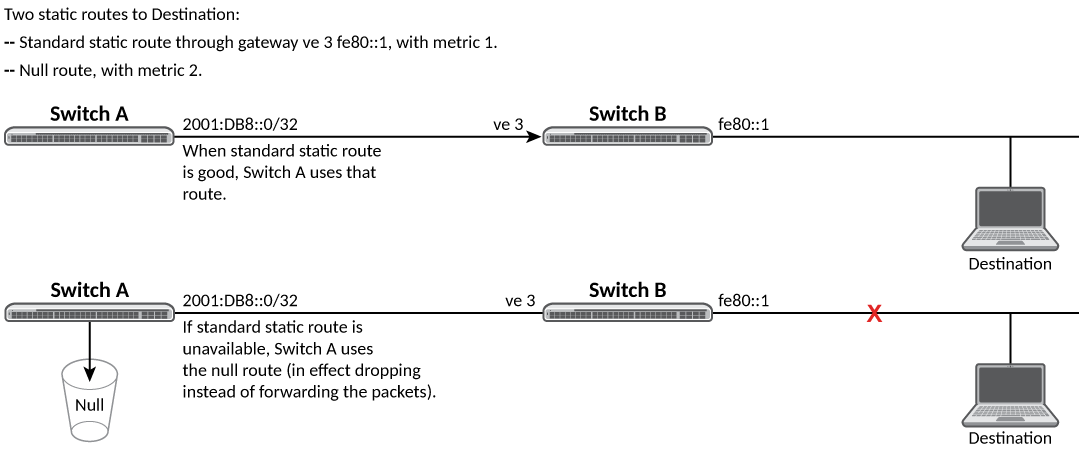
Note: You cannot add a null static route
to a network if there is already a static route of any type with the same metric
you
specify for the null route.
- Enter global configuration mode.
- Configure the preferred route to
a destination. This example creates a static route to destination network addresses that have an IP address beginning with 192.168.7.0. These destinations are routed through the next-hop gateway 192.168.6.157. The route carries the default metric of 1.
- Configure the null route to the
same destination with a higher metric. This example creates a null static route to the same destination. The metric is set higher so that the preferred route is used if it is available. When the preferred route becomes unavailable, the null route is used, and traffic to the destination is dropped.
The following example creates a primary route to all destinations beginning with 192.168.7.0. It creates an alternative null route to drop the packets when the primary route is not available.
device# configure terminal
device(config)# ip route 192.168.7.0/24 192.168.6.157
device(config)# ip route 192.168.7.0/24 null0 2