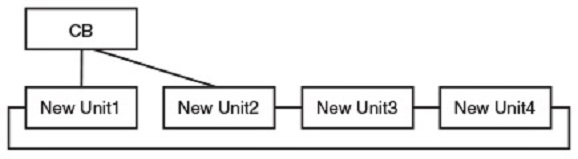
Special cases where a link can be removed to select all new units
You can select units to include in a Campus Fabric domain as part of SPX interactive-setup. When you select units, all their interconnections are selected as SPX ports or SPX LAGs. To prevent you from creating an invalid Campus Fabric topology, the interactive-setup utility does not generally allow you to remove links. In certain cases, however, you are allowed to remove a link to present all potential units in a valid topology.
- Case 1—A ring of new units has one uplink to the CB or to another PE unit.
- Case 2—A ring of new units has two uplinks to the CB or other PE units, and the two uplinks are on two new neighbor units.
Case 1. The following example shows a ring of potential units connected through a single uplink to the Campus Fabric domain.
      31/2/1
        |
        |
       3/1
     +-----+        +-----+        +-----+
 -2/3| #1  |2/1--2/1| #2  |2/4--2/3| #3  |2/1-
 |   +-----+        +-----+        +-----+   |
 |                                           |
 |-------------------------------------------|
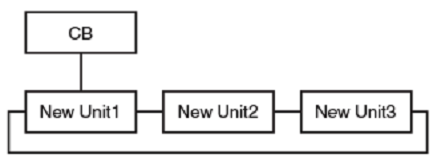
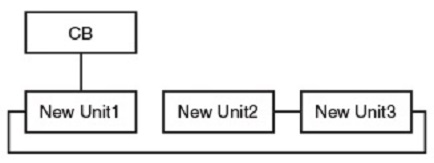
To form a valid topology, the user has the option to remove the link between units 1 and 2 or the link between units 1 and 3.
Case 2. The following example shows a ring of new units with two uplinks through neighboring units 1 and 2.
     1/1/10           21/2/1
        |              ||
        |              ||
       3/1            3/1
     +-----+        +-----+        +-----+        +-----+
 -2/3| #1  |2/1--2/1| #2  |2/4--2/3| #3  |2/1--2/3| #4  |2/1-
 |   +-----+        +-----+        +-----+        +-----+   |
 |                                                          |
 |----------------------------------------------------------|
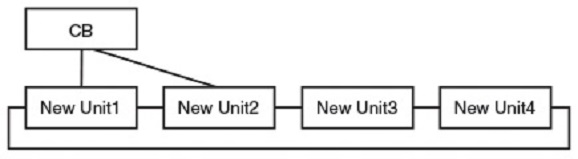
The user has the option to remove the link between units 1 and 2 to form a valid topology.