Moving a PE unit and retaining its ID (manual methods)
Note: Using the
There are two ways to move a PE unit or a chain of PE units to a different CB port
and retain the PE ID so the port configurations under the PE ID that has been moved
do not require changes.
spx allow-pe-movement command allows PEs to retain their IDs when they are disconnected and moved to another
physical port. Refer to
Configuring SPX to move PE units without changing IDs for more information.
- On the CB, change or add the
pe-idconfiguration for the CB port. - Remove the
pe-idconfiguration of the affected PE units (both moved and retained units) so the ID assignment is based on the suggested ID or the previous ID assigned to the PE unit.
Consider the two configurations shown in the following figure.
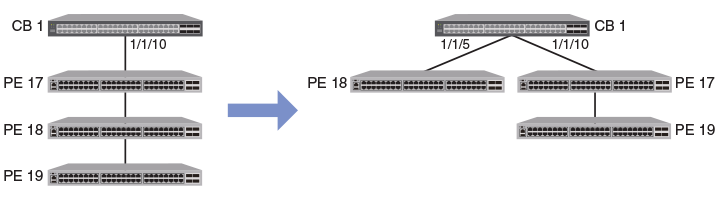
Suppose you want to move PE unit 18 to SPX port 1/1/5 on the CB. If you do not change
the
pe-id configuration from the CB, PE unit 18 will be assigned a new ID. PE unit 19, still
connected on SPX port 1/1/10, becomes PE unit 18. As a result, the port configurations
for PE unit 18 and 19 no longer apply to the renumbered units.
The following procedures describe the two options for retaining the PE ID for the moved PE unit.