Detecting new links and converting PE chains to rings
From release 08.0.70, SPX interactive-setup and zero-touch provisioning can detect links between a CB unit and an edge PE or between two edge PE units. When these links are detected, the associated PE chain or, if present, both associated PE chains are converted into a ring.
multi-spx-lag command to change SPX LAGs on a live link.
The capability to convert one or two PE chains to a ring is fully integrated into both SPX interactive-setup and zero-touch provisioning. Both utilities can discover new units and/or convert PE chains in a single process. If SPX interactive-setup detects both possibilities, the interactive process handles PE chain-to-ring conversion before handling new units.
When SPX interactive-setup or zero-touch provisioning detects links between an CB
and an edge PE or between two edge PEs and converts PE chains to a ring, the system
generates any needed SPX port or SPX LAG configuration for the ring. No reload is
required; however, you should execute the
write memory command to save the new SPX port or SPX LAG configuration.
A link can be detected only when at least one end sends probes. The following ports transmit probe packets:
- CB SPX ports and CB SPX LAGs that have no live PE link
- CB ports configured as zero-touch ports
- Edge PE ports on non-base modules 2, 3, or 4, excluding upstream SPX ports or SPX LAGs and any ports with configuration. In this case, an edge PE port is always the last unit of a chain.
As an example, if a base-module port on an edge PE connects to a CB zero-touch port, the link can be detected because, although PE base-module ports do not send probes, the CB zero-touch port at the other end of the link does.
If a link connects to a CB port, the port must be an SPX port, part of an SPX LAG, or a zero-touch port. Otherwise, the system prints a warning message to remove the link. A PE port detected on the link can be any port as long as it does not have configuration.
All links between two units are assigned to a single SPX LAG. You should complete all physical connections before running SPX interactive-setup or enabling zero-touch provisioning because once one or two PE chains form a ring, the ring can no longer send the probes used by the two utilities to detect new units or links.
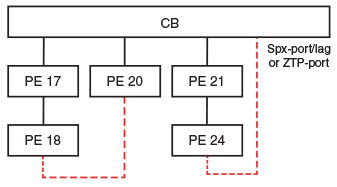
The following figure shows the two general ways that PE chains are converted to rings. A dashed line indicates a new link, which may consist of one or multiple physical links.
Invalid PE rings
The SPX system runs many sanity checks to confirm that the connections are valid. When an invalid connection is discovered, the system prints a warning message that describes the invalid connection and requests that the connection be removed.
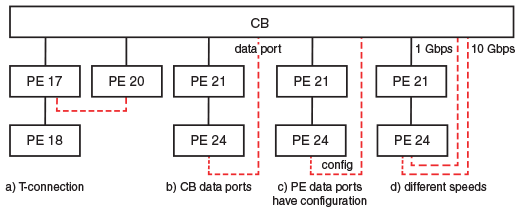
The following figure illustrates several invalid connections that cannot form a PE ring.
| Label | Reason PE ring cannot be formed |
|---|---|
| a | T-connections are invalid. |
| b | The CB port is not an SPX port, SPX LAG member, or zero-touch-port. |
| c | The PE data port has configuration. |
| d | Links of different speeds cannot be automatically merged into an SPX LAG. |