Property Management Overview
Main Property Management Terms
Cloudpath property management utilizes dynamic pre-shared keys (DPSKs) that you can structure into a logical group called a property. The following terms are used throughout this manual, and are depicted in the diagram below.
- Property: A single building, such as an office building or an apartment building within a larger complex.
- Unit: A well-defnined section of a property, such as one apartment within an apartment building.
- Tenant: The regular occupant of a unit.
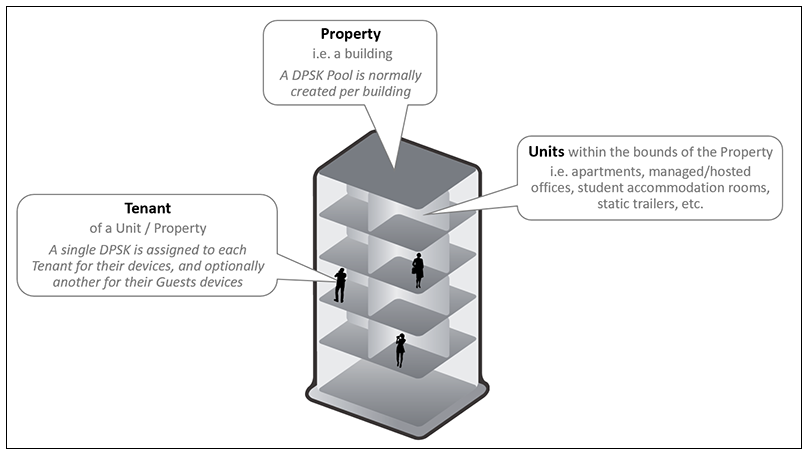
You can manage multiple properties with the Cloudpath property management feature, but, for the purposes of this manual, many of the concepts are illustrated using an example of a single apartment building that contains four units.
Within such a setup, the basic steps include:
- Creating the property in the Cloudpath UI.
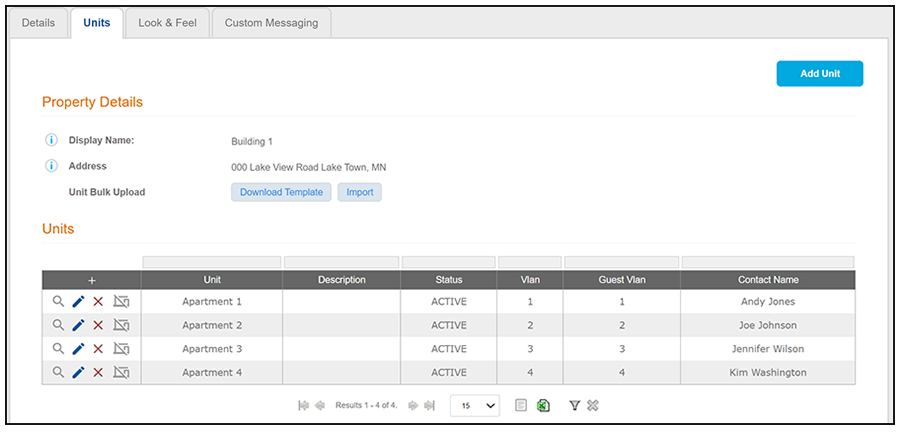
- Adding units to that property. Each time one unit is added to a property, a tenant portal for that unit is automatically enabled. An example of how the Cloudpath UI would look after four units have been added to a property is shown below (and described later in this manual):
- Setting up the look and feel of the automatically created tenant portal.
- Notifying the residents of each unit about how to access the tenant portal (which has its own UI) and how to connect their devices to the wi-fi network in the property. Such notifications occur automatically based on how you configure them during creation of the property. You can use the Custom Messaging tab to change the default text of various notifications.
- Creating a management portal that is accessible to registered users to perform designated tasks on properties or units added to this portal.
Audience for This Manual
This manual is intended for the property manager -- the person who administers the Cloudpath system, has access to the Cloudpath UI, and so on. This manual describes how to use the Cloudpath UI to set up the tenant portal UI, and to create the management portal UI. Also described are how tenants would use the tenant portal UI and how property personnel (such as a front-desk worker in a property company) can use the management portal UI.
Using Network Segmentation With Property Management
Network segmentation is an architectural approach for network administrators tasked with deploying individual VLANs to each tenant throughout a property. Network segmentation requires Cloudpath 5.9R3 or later and virtual SmartZone 6.1 or later. The feature can be used for wi-fi clients as well as wired clients that are connected to Ethernet ports on the APs. For information on how to configure network segmentation, refer to the RUCKUS Network Segmentation Configuration Guide.
Network segmentation can be used in conjunction with the features described in this guide, such as using a tenant portal UI, configuring a management portal and using the management portal UI.