Managing DPSK Passphrases
Managing Dynamic Pre‑Shared Key (DPSK)
passphrases from the RUCKUS One web interface is essential for maintaining a secure and efficient Wi-Fi
environment. The DPSK security method assigns each user or device a unique passphrase,
reducing the risk of unauthorized access and preventing password leaks.
Complete the following steps to access the Passphrases page of a configured DPSK service:
- On the navigation bar, select
. The DPSK page is displayed.
- Click the name of the DPSK
service you want to manage.The details page of the selected DPSK service is displayed.
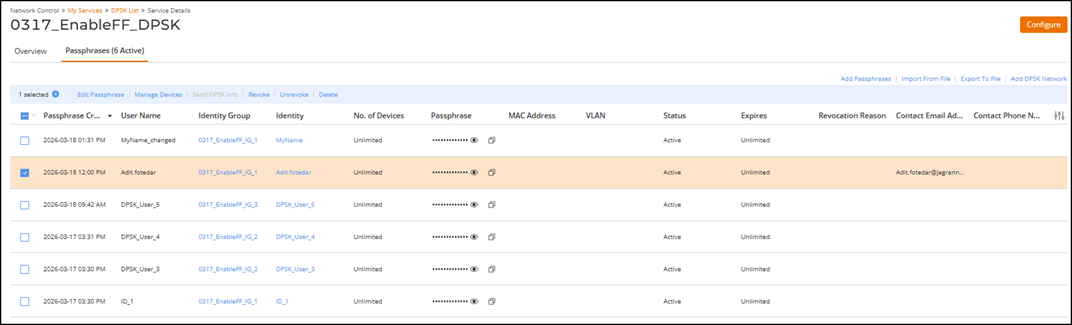
- Select the Passphrases tab to view and manage passphrase details for the DPSK service and its associated client identities.
- Review the following DPSK passphrase details:
- (Optional) Click Add...The following options are displayed to perform passphrase management tasks for the DPSK service:
- Add Passphrases: Create new passphrases. Refer to Adding a Passphrase for a DPSK User for more information.
- Import From File: Import passphrases from a CSV file. Refer to Importing DPSK Passphrases from a CSV File for more information.
- Export to File: Export passphrases to a CSV file. Refer to Exporting DPSK User Credentials for more information.
- Add DPSK
Network: Add a DPSK network.
The Add DPSK Network dialog box is displayed. Refer to Creating a Network That Uses a Dynamic Pre-Shared Key for more information.
- (Optional) Click Configure to edit the DPSK service configuration. Refer to Editing or Deleting a DPSK Service for more information.
- (Optional) Select on the
 icon in the upper right-hand corner to export and download the list in CSV
format.
icon in the upper right-hand corner to export and download the list in CSV
format. - (Optional) Click on the
 icon to reload the latest information.