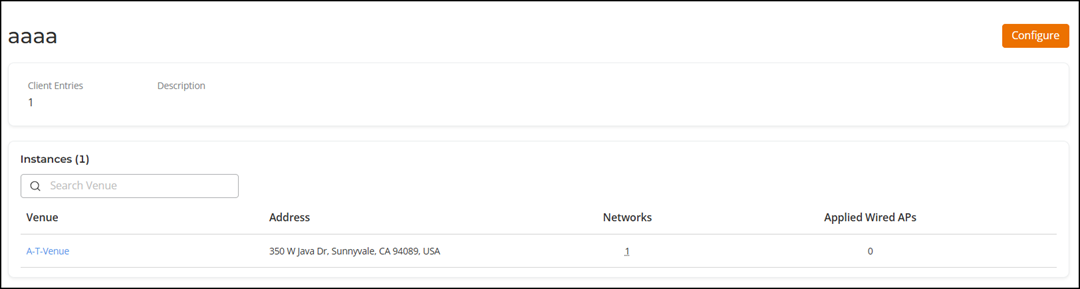
Client Isolation Profile Details
Client isolation prevents clients on the
same network from communicating with each other. Client isolation segregates Layer
2 traffic
from all clients. It prevents direct communication between devices and is a prudent
choice
in a guest network when unknown users are joining the same network. You can create
exceptions to client isolation (such as allowing access to a local printer, for example)
by
creating Client Isolation Allow list.
Complete the following steps to view the Client Isolation details:
- From the navigation bar, select
.The My Services page is displayed.
- In the My
Services page, click Client Isolation
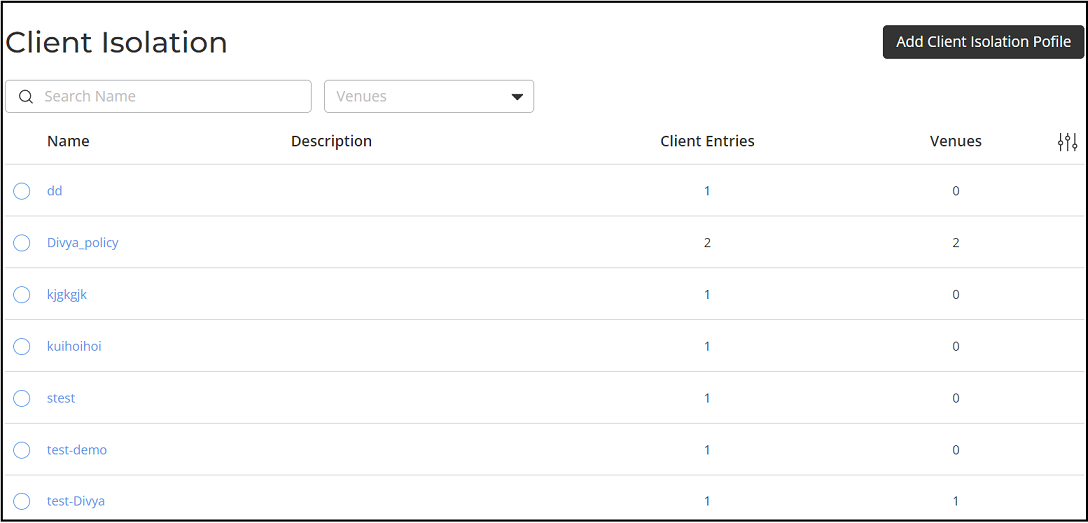
tile.The Client Isolation page is displayed. The Client Isolation profiles are displayed in the table. The Name column displays the Client Isolation profiles names, Description column displays the Client Isolation profiles description, Client Entries column displays the total number of instances, and Venue column display the total number of venues that profile is used in.
- In the Name column, click the profile name.