MAC Registration Process
In this example, the user attempts to access the Internet, is redirected to the captive portal on Cloudpath and proceeds through the enrollment workflow, during which, the user is prompted for information.
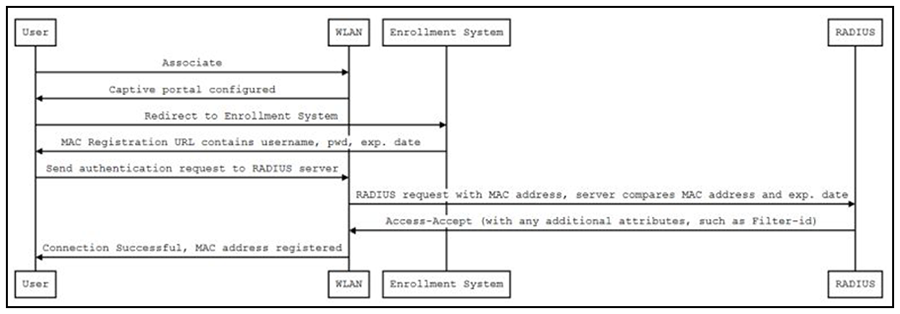
At the MAC registration step, Cloudpath sends a registration URL to the client for use in the RADIUS authentication request. The registration URL contains the username, password, and validity period for the MAC registration.
The access point obtains the MAC address of the user device and sends this information in the RADIUS request to the RADIUS server. The RADIUS server compares the MAC address and expiration date with existing user information. If the validity period and expiration period matches, the RADIUS server authorizes the authentication and returns an Access-Accept to the access point. If other RADIUS attributes are configured, such as the Filter-Id, they are returned with the Access-Accept.
Subsequent access requests from the user to the access point cause the AP to open the firewall to allow access to the Internet. This occurs until the validity period expires and the user must re-enroll.