Viewing Policy Information
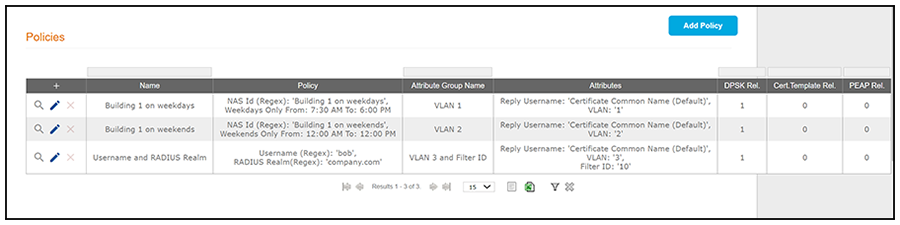
The following table shows you an example of what a policy table looks like after three different policies have been created and assigned to DPSK pools, certificate templates, or PEAP.
You can use the policy table as follows:
Description of Policy Table
| Column Title | Description |
|---|---|
| + |
|
| Name | The name of the policy as configured in the Display Name field in the Policy configuration screen, an example of which is shown in Create Policy Screen. |
| Policy | All the conditions that you set when you created the policy are listed in this column. For example, the "Building 1 on weekdays" policy conditions are the ones that were configured in the example shown in Create Policy Screen. |
| Attribute Group Name | The name of the group that has been selected in the RADIUS Attribute Group drop-down when the policy was created. For the "Building 1 on weekdays" policy shown in this example, the group name VLAN 1 matches the selection that was shown in the example in Create Policy Screen. |
| Attributes | Lists all the attributes that were set for the corresponding
RADIUS attribute group name. For the "VLAN 1" attribute group name shown
in this example, the attribute "VLAN 1" is listed because that is the
only attribute that was set during the configuration of the VLAN 1
RADIUS attribute group name, as shown in Create RADIUS Attribute
Screen.
Note: The "Reply Username"
attribute applies only to certificate templates.
|
| DPSK Rel, Cert Template Rel, and PEAP Rel | The number of times that a policy has been assigned to each
category of authentication.
new for
5.8
|
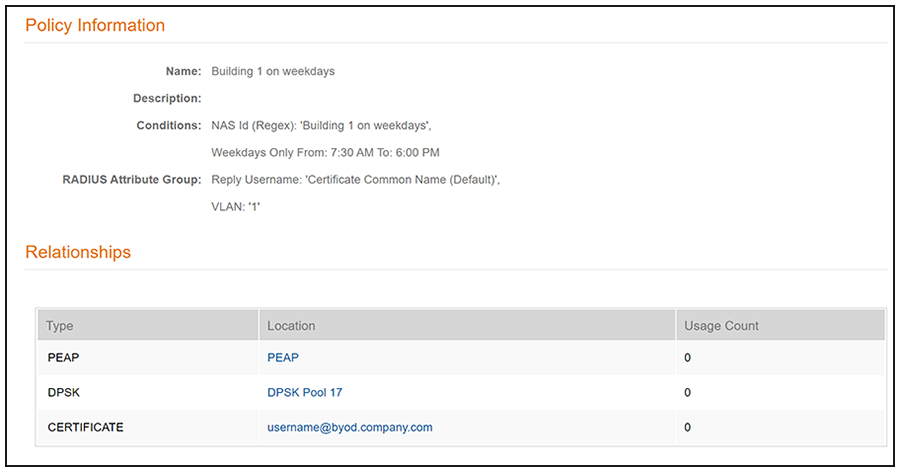
The screen above indicates that the policy is currently being used by PEAP, one DPSK pool, and one certificate. The "Location" column of this screen in the UI provides live links to the specific configuration areas where the policy is used.
The Usage column will be incremented each time a device is assigned to the policy in question. Also, If a device then gets assigned to a different policy and later gets reassigned to its original policy, the usage count of the original policy will be incremented.