Switching Pre-Release-5.8 Microsoft CA Certificate Templates to Policy-Assigned Templates
Microsoft CA Certificate templates are
created differently in Release 5.8 (and later) from prior releases. If you have
older
Microsoft CA Certificate templates in your system, you can continue to use them
the same way
in 5.8 or later, or you can convert them to the policy-type templates that are created
in
Release 5.8 going forward. Once you switch an old template to the new policy-type
format,
you cannot revert back to the pre-5.8 template configuration.
Follow the steps below to convert an old certificate template to the policy-based template:
Nick - Plz check the following steps for the correct order,
thanks. Also, plz check that the screens shot is applicable for a Microsoft CA
cert
since I actually got the screen shot when converting an Onboard cert to
5.8.
- In the UI, go to Certificate Authority > Manage Templates, then click the Wrench icon for the desired certificate template.
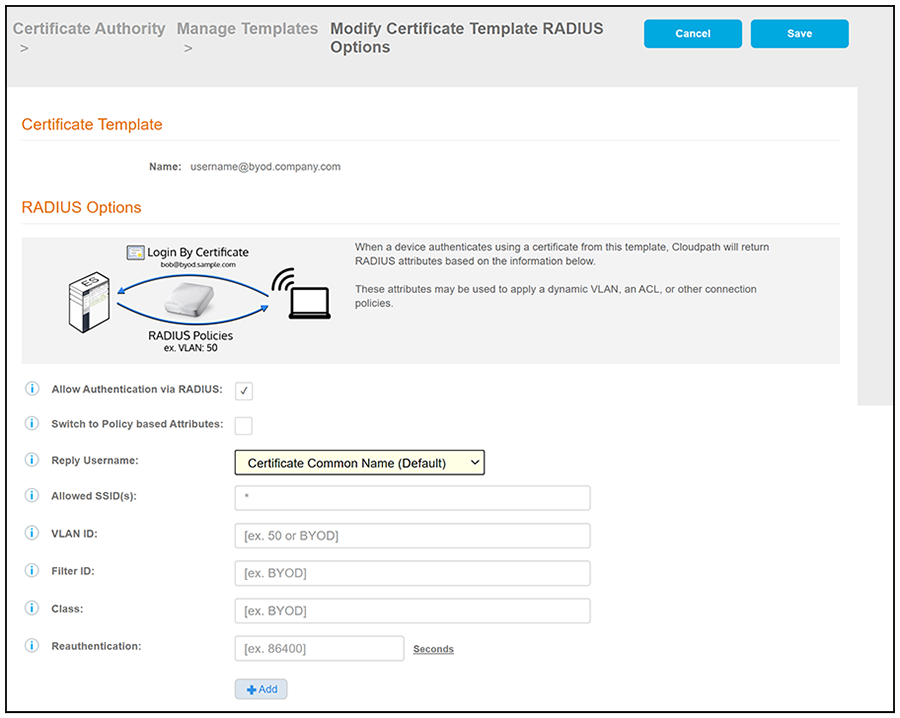
- On the ensuing screen, click the Edit RADIUS Attributes button
in the "RADIUS Attributes (Non-Policy)" portion of the screen. The following screen
is then displayed.
Note: Be sure to take note of the existing values of the fields shown in the screen above because you will re-use these values when you create a new RADIUS attribute group.
- Under RADIUS Options, check the "Switch to Policy-Based Attributes" box.
- On the ensuing screen, select your settings in the "RADIUS Options" portion of the screen, then click Save to complete the process of converting the certificate template to the policy-based template.
- Select the RADIUS Policies tab and add any desired policies. For instructions on adding policies, see Adding RADIUS Policies to the CA Certificate Template.