Checking the AFC Status in Unleashed
After setting the GPS coordinates for an
AP, you can view the AFC status from the RUCKUS Unleashed web interface.
- From the main menu, select .
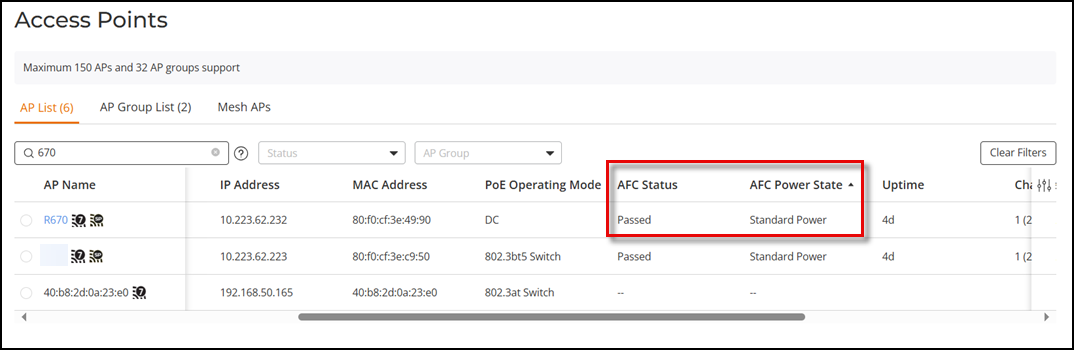
- In the AP
List page, check the AFC status and power state:Following are the possible AFC statuses:
- N/A: AFC is disabled.
- –: AP does not support AFC.
- Wait for height configuration: Waiting for the height configuration to be set.
- Wait for location: Waiting for the geolocation information to be set.
- Wait for response: Waiting for AFC server response to proceed further.
- Passed: AFC is functioning correctly and has passed the necessary checks.
- Rejected: The AFC Proxy server determined that there are no available channels for this location and returned an AFC Reject response. If this is an indoor AP, it automatically switches to low power mode. If this is an outdoor AP, it automatically turns off the 6 GHz radio.
- AFC server failure: An error occurred in the AFC proxy server.
- AFC not required: At least one of the following conditions occurred:
Following are the possible AFC power states:
- –: AP does not support AFC.
- 6 GHz radio off: The outdoor AP is not using the 6 GHz radio and is running in low power mode.
- Low Power Indoor: The AP is running in lower power indoor mode. Click the tool tip icon to display the reason for this state.
- Standard Power: The AP is running in standard power mode.