ICX 7650 Stacking Ports
ICX 7650 devices support stacking through Module 3 on the rear panel, shown in the following figure.
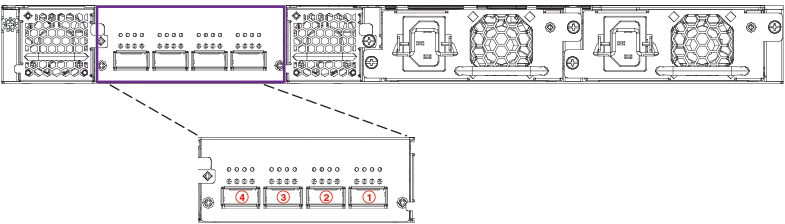
The rear module is fixed, and its ports can be configured for stacking or uplink. By default, the rear module supports 100-Gbps stacking on ports 1 and 2 (1/3/1 and 1/3/2). When 100-Gbps stacking is enabled, ports 3 and 4 are not used. Stacking trunks are not supported on 100-Gbps connections in a stack that contains more than two units. However, a 100-Gbps linear-topology trunk (ports 1/3/1 to 1/3/2) is supported in a two-unit stack.
The rear-module stacking configuration can be changed to support four 40-Gbps stacking ports using the rear-module uplink-40g command. Stacking ports or stacking trunks can be configured on 40-Gbps connections.