Viewing Events

An event is an occurrence or the detection of certain conditions in and around the RUCKUS IoT Controller. An AP rebooting, detection of a RUCKUS I100 IoT Module, module undetection, and module swap are all examples of events.
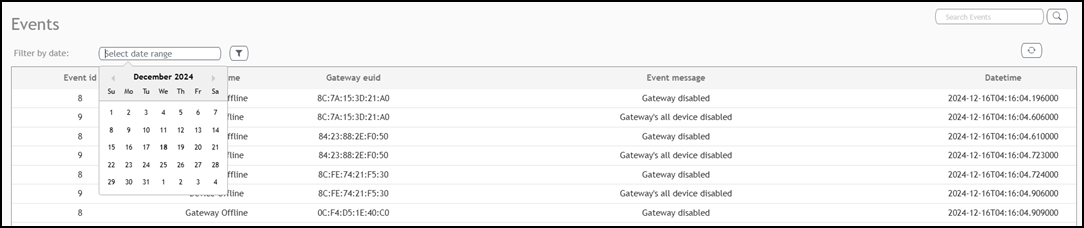
To view the events, perform the following steps.

  1. From the main menu, click Events.
    The Events page is displayed.

    Viewing Events

    Viewing Events
  2. Click Select date range.

    A calendar tool is displayed to select specific dates.

  3. Click the filter icon.

    Events within the specified range will appear in the table, which include Event id, Event name, Gateway euid, Event message and Datetime.

  4. Click the icon to refresh the image.
  5. Click the icon to search the events.

    Few events are listed below.

    Events

    Event Id Event
    1

    USB dongle inserted /removed

    2

    AP rebooted

    4

    Dongle swap

    5

    Message delivery to the device failed

    6

    Hot upgrade related events

    7

    Radio firmware upgrade related events