Adding LBS User
- From the main menu, go to .
- Device: From the Device list, select the name of the device.
- MAC Address: In the MAC Address field, enter the MAC address of the device.
- New Device Name: In the New Device Name field, enter a new name if you want to change the name of the device.
- Manufacturer: In the Manufacturer field, enter the name of the manufacturer if it is not already displayed.
- Model: In the Model field, enter the number of the model if it is not already displayed.
- Type: In the Type field, enter the name of the type if it is not already displayed
- Location: From the Location list, select the location.
- Floor: In the Floor field, enter the number of the floor if it is not already displayed.
- Building: In the Building field, enter the number of the building if it is not already displayed.
- Under Enablement, select Device Enabled if you want to enable the device at the site location. Select Video Enabled if you want to capture video at the site location.
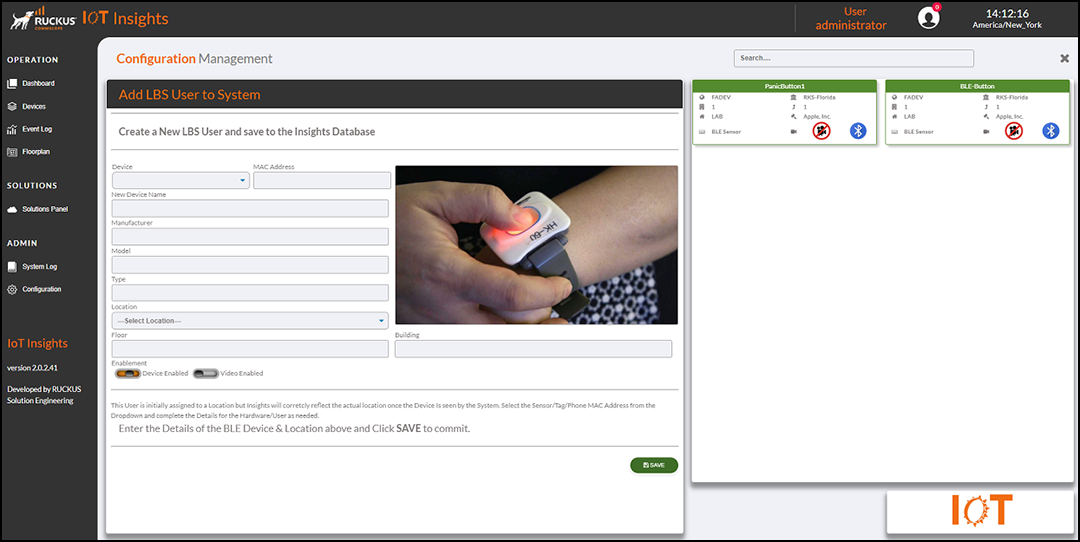
The Current BLE Devices table lists the LBS user details, including the location, name, type, model name, vendor name, and network.
You can enter search criteria in the Search field to search the Current BLE Devices table for information.