Example: Configuring IPv6 RA Guard in a Network
The following example shows how to configure IPv6 RA guard on devices in a network. In this network topology, port A (ethernet 1/1/1) is configured as trusted, port B (ethernet 1/1/2) is configured as untrusted, and port C (ethernet 1/1/3) is configured as host. A whitelist is configured on port B.
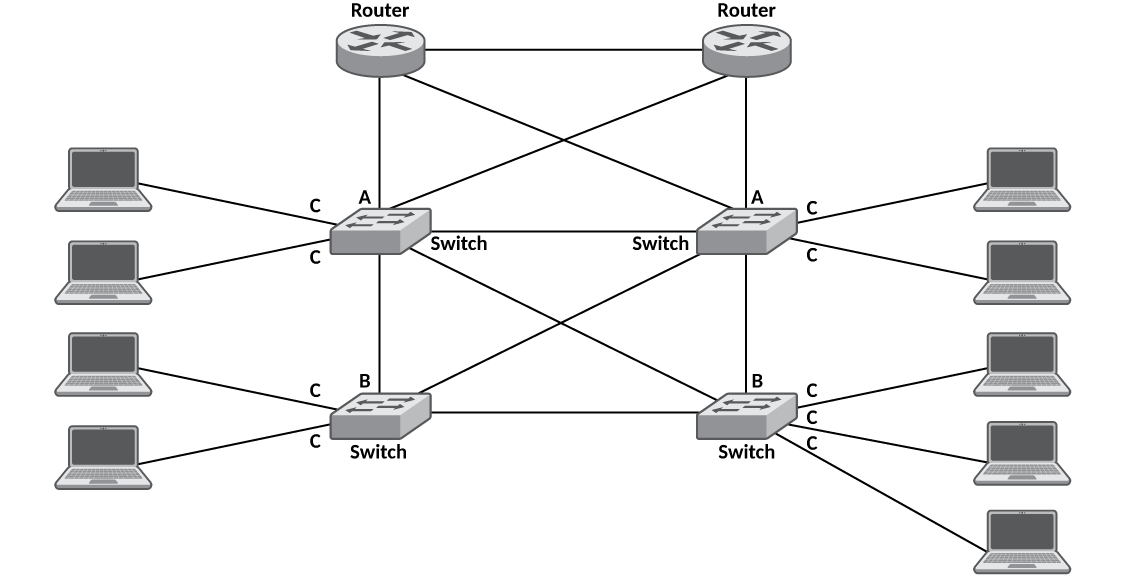
Configuring Port A:
Configure port A as a trusted port.
device(config)# interface ethernet 1/1/1
device(config-int-e1000-1/1/1)# raguard trust
Configuring Port C:
On port C, create an RA Guard policy with no other options and associate the policy with a VLAN of which C is a member of. This helps block all RAs from C ports.
device(config)# ipv6 raguard policy policyC
device(ipv6-RAG-policy policyC)# exit
device(config)# ipv6 raguard vlan 1 policy policyC
Configuring Port B:
On port B create an RA Guard policy with supported whitelist. This helps to permit RAs from only those sources. Associate a whitelist or prefix list with the RA guard policy.
device(config)# ipv6 raguard whitelist 1 permit fe80:db8::db8:10
device(config)# ipv6 raguard whitelist 1 permit fe80:db8::db8:5
device(config)# ipv6 raguard whitelist 1 permit fe80:db8::db8:12
device(config)# ipv6 prefix-list raguard-prefix-list1 permit 2001::db8::/16
device(config)# ipv6 raguard policy policyB
device(ipv6-RAG-policy policyB)# whitelist 1
device(ipv6-RAG-policy policyB)# prefix-list raguard-prefix-list1
device(ipv6-RAG-policy policyB)# exit
device(config)# interface ethernet 1/1/2
device(config-int-e1000-1/1/2)# raguard untrust
device(config-int-e1000-1/1/2)# exit
device(config)# ipv6 raguard vlan 2 policy policyB