Web Authentication Configuration Considerations
Web Authentication is modeled after other RADIUS-based authentication methods currently available on RUCKUS edge switches. However, Web Authentication requires a Layer 3 protocol (TCP/IP) between the host and the authenticator. Therefore, to implement Web Authentication, you must consider the following configuration and topology configuration requirements:
- Web authentication works only when web-management is enabled.
- Web authentication works only when either the HTTP server or the HTTPS server is enabled on the device.
- Web Authentication works only on the default HTTP or HTTPS port.
- When web authentication is enabled, global web-management cannot be disabled.
- If web authentication is enabled, the last remaining protocol (HTTP or HTTPS) cannot be disabled. At least one must remain active.
- Web Authentication cannot be enabled if global web-management is disabled.
Attempting to enable web authentication in this state results in an error message.
You must first re-enable global web-management. When global web-management is
re‑enabled, HTTPS becomes enabled by default. If HTTP is required, it must be
enabled using the
web-management httpcommand. Disabling web authentication is not impacted by whether HTTP or HTTPS servers are enabled or disabled. - The host must have an IP address prior to Web Authentication. This IP address can be configured statically on the host; however, DHCP addressing is also supported.
- If you are using DHCP addressing, a DHCP server must be in the same broadcast domain as the host. This DHCP server does not have to be physically connected to the switch. Also, DHCP assist from a router may be used.
- Web Authentication is not supported on a reserved VLAN.
- Web-authentication does not support ‘tagged
port.’ Tagged port in web-authentication VLAN works only when used as ‘trust-port.’
Trusted ports (configured using the
trust-portcommand) can be tagged to multiple VLANs including web-authentication VLAN as the uplink. - If a port that is a member of a web-authentication VLAN is also a tagged member of another VLAN, incoming traffic through that port is blocked, including traffic intended for any VLAN to which it belongs. In a network environment that requires web authentication and includes AP/wireless and ICX devices, RUCKUS recommends that web authentication for wireless devices be configured directly on network AP devices and web authentication for wired devices be configured directly on the ICX devices in the network. Separating the configuration in this way prevents the dropped traffic and delays that would arise from web-authentication ports being tagged in other VLANs.
- Each Web Authentication VLAN must have a virtual interface (VE).
- The VE must have at least one assigned IPv4 address.
Web Authentication is enabled on a VLAN. That VLAN becomes a Web Authentication VLAN that does the following:
- Forwards traffic from authenticated hosts, just like a regular VLAN.
- Blocks traffic from unauthenticated hosts except from ARP, DHCP, DNS, HTTP, and HTTPs that are required to perform Web Authentication.
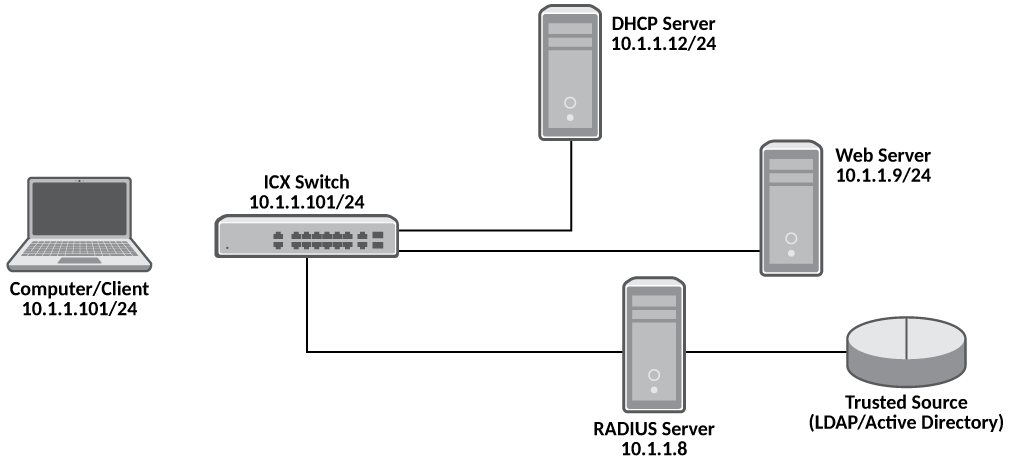
The Basic topology for web authentication figure shows the basic components of a network topology where Web Authentication is used. You will need:
- A RUCKUS ICX switch running a software release that supports Web Authentication
- DHCP server, if dynamic IP addressing is to be used
- Computer/host with a web browser
Your configuration may also require a RADIUS server with some Trusted Source such as LDAP or Active Directory.