Configuring Multicast VLAN Registration
Complete the following steps to configure Multicast VLAN Registration (MVR) on the device as displayed in the sample configuration topology.
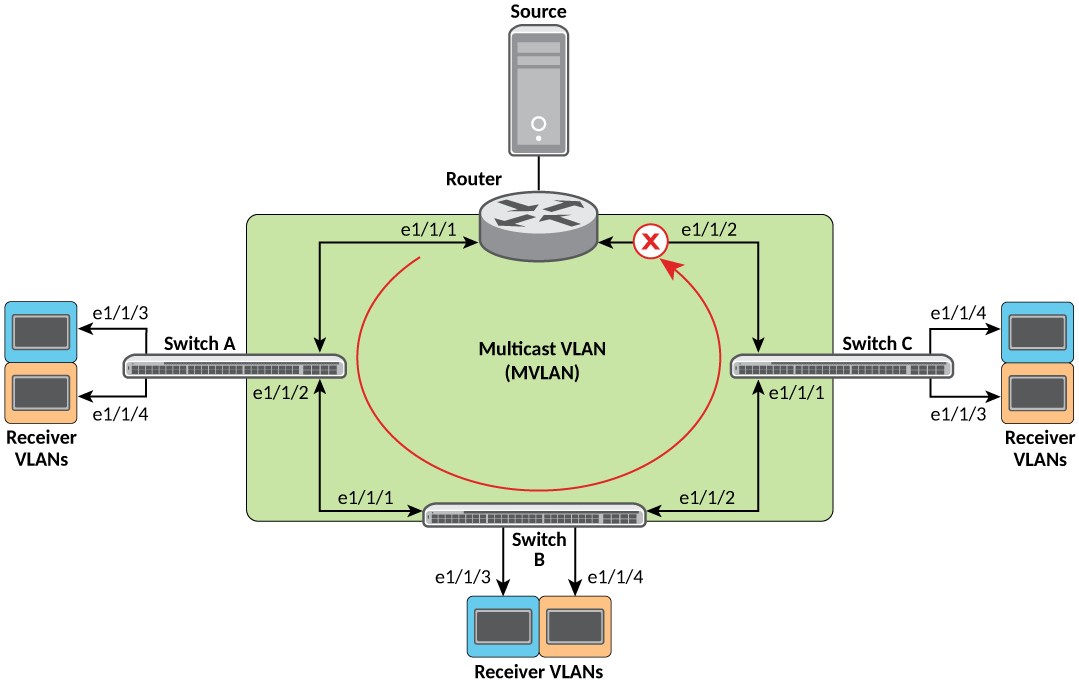
- Enter global configuration mode.
- Enable MVR globally.
- Configure group-to-MVLAN
mapping.
device(config)# ip multicast mvr mvlan 1 group 225.0.0.1
device(config)# ip multicast mvr mvlan 1 group 226.0.0.1 count 100
Areceiver VLAN receiving IGMP group joins gets associated to the MVLAN configured via MVLAN to the group mapping command. This command allows you to selectively associate sets of groups to the MVLAN. Moreover, you can associate unique group sets to different MVLANs, and therefore create multiple MVLANs in the system.
Note: A group, in the absence of such mapping, is processed in the snooping module.Note: While changing group-map configs (adding or removing), you must clear the mcache manually to switch between the snooping and the MVR module. - Create a receiver VLAN on all
switches A, B, and C and add receiver ports as tagged. Enable the MVR
receiver.
device(config)# vlan 11
device(config-vlan-11)# tagged ethernet 1/1/3 ethernet 1/1/4
device(config-vlan-11)# multicast mvr receiver
device(config-vlan-11)# multicast passive
Tagged and untagged interfaces are supported. - Configure the source VLAN (MVLAN) on all switches (A, B, and C). Add source ports to the VLAN. Enable the MVR source.