Configuring IPv6 PIM Anycast RP
- Enter global configuration mode.
- Enable IPv6 PIM.
- Configure an RP address.
The RP address is shared among multiple IPv6 PIM routers.
- Configure IPv6 PIM Anycast RP.
- Exit to privileged EXEC mode.
- Display information for an IPv6 PIM Anycast RP interface.
The example shown in the following figure is an IPv6 PIM Anycast-enabled network with three RPs and one PIM-FH router connecting to its active source and local receiver. Loopback 2 in RP1, RP2, and RP3 each have the same IPv6 addresses 1001:1. Loopback 3 in RP1, RP2, and RP3 each have separate IPv6 address configured to communicate with their peers in the Anycast RP set.
The RP shared address 1001:1 is used in the PIM domain. IPv6 addresses 1:1:1::1, 2:2:2::2, and 3:3:3::3 are listed in the ACL that forms the self-inclusive Anycast RP set. Multiple Anycast RP instances can be configured on a system; each peer with the same or different Anycast RP set.
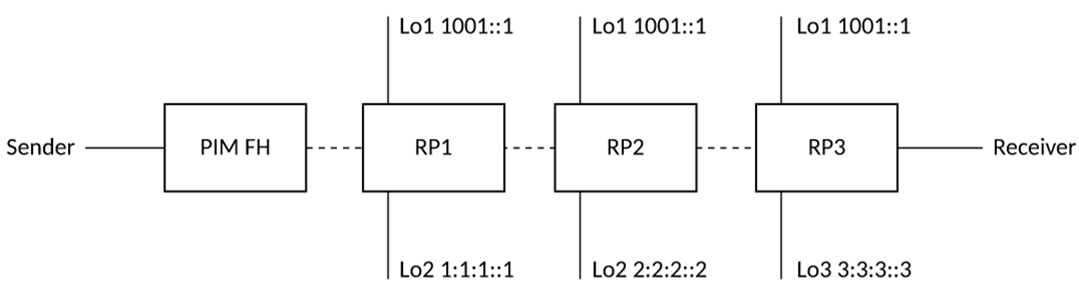
The following example is a configuration of IPv6 PIM Anycast RP 1001::1.The example avoids using the loopback 1 interface when configuring IPv6 PIM Anycast RP because the loopback 1 address could be used as a router-id. An IPv6 PIM First Hop router will register the source with the closest RP. The first RP that receives the register will re-encapsulate the register to all other Anycast RP peers. Refer to the preceding figure for a view of the IPv6 PIM Anycast RP Network.
The RP shared address 1001:1 is used in the IPv6 PIM domain. IPv6 addresses 1:1:1::1, 2:2:2::2, and 3:3:3::3 are listed in the ACL that forms the self-inclusive Anycast RP set. Multiple Anycast RP instances can be configured on a system; each peer with the same or different Anycast RP set.
device(config)# interface loopback 2
device(config-lbif-2)# ipv6 address 1001::1/96
device(config-lbif-2)# ipv6 pim-sparse
device(config-lbif-2)# interface loopback 3
device(config-lbif-3)# ipv6 address 1:1:1::1/96
device(config-lbif-3)# ipv6 pim-sparse
device(config-lbif-3)# ipv6 router pim
device(config-ipv6-pim-router)# rp-address 1001::1
device(config-ipv6-pim-router)# anycast-rp 1001::1 my-anycast-rp-set
device(config-ipv6-pim-router)# ipv6 access-list my-anycast-rp-set
device(config-ipv6-access-list my-anycast-rp-set)# permit ipv6 host 1:1:1::1 any
device(config-ipv6-access-list my-anycast-rp-set)# permit ipv6 host 2:2:2::2 any
device(config-ipv6-access-list my-anycast-rp-set)# permit ipv6 host 3:3:3::3 any