Configuring VLAN filtering for RSPAN on access switches with an intermediate switch
The following example configures VLAN-filtered mirror traffic that passes through intermediate switches to its destination.
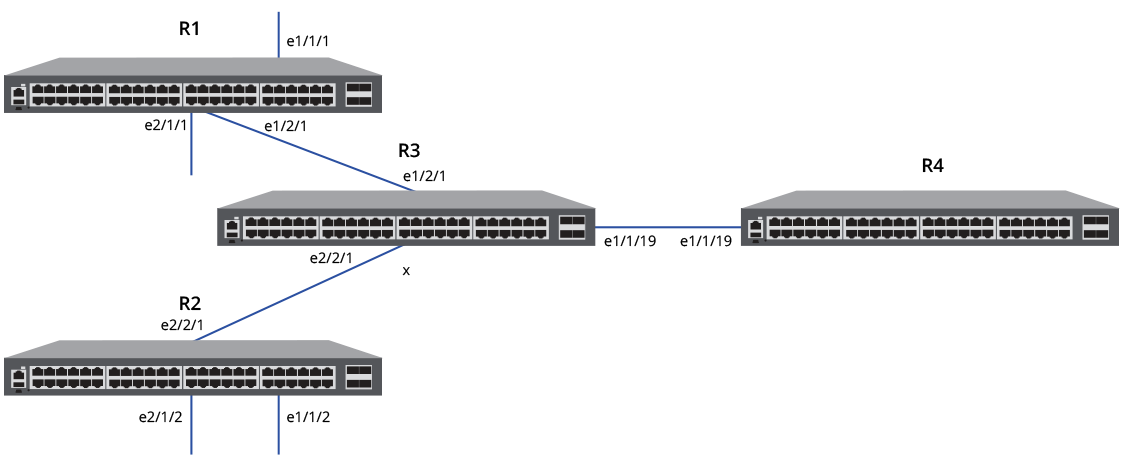
- Configure Access Switch Router 1.
- Configure the RSPAN VLAN and VLAN ID (VLAN 191 in the example).
- Configure the mirror filter to filter VLANs 100 through 108.
- (Optional) Verify the VLAN memberships for both of the monitored ports.
- Configure VLAN memberships for the monitored ports if necessary.
- Configure Access Switch Router 2.
- Configure the RSPAN VLAN and VLAN ID (VLAN 197 in the example).
- Configure the mirror filter to filter VLANs 100 thorugh 108.
- (Optional) Verify the VLAN memberships for both of the monitored ports.
- Configure VLAN memberships for the monitored ports if necessary.
- Configure Intermediate Switch Router 3.
- Configure RSPAN
transit VLANs as required on intermediate Router 3 (VLANs
191 and 197 in the example).
The
rspan-transit-vlancommand creates a transit VLAN that forwards RSPAN mirrored traffic from access switches, and MAC learning is disabled on the VLAN.device# configure terminal device(config)# rspan-transit-vlan 191 device(config-rspan-transit-vlan-191)# tagged ethernet 1/2/1 ethernet 1/1/19 device(config-rspan-transit-vlan-191)# exit device(config)# rspan-transit-vlan 197 device(config-rspan-transit-vlan-197)# tagged ethernet 2/2/1 ethernet 1/1/19 device(config-rspan-transit-vlan-197)# end
The following example configures access Router 1 and Router 2 for RSPAN. Both Router 1 and Router 2 are configured to filter out mirrored traffic on VLANs 100 through 108. The example configures an intermediate Router 3 with the RSPAN transit VLANs that match the VLAN IDs configured for RSPAN on Router 1 and Router 2 (VLANs 191 and 197).
device# configure terminal <-Configure R1 RSPAN
device(config)# rspan-vlan 191
device(config-rspan-vlan-191)# tagged ethernet 1/2/1
device(config-rspan-vlan-191)# rspan destination ethernet 1/2/1
device(config-rspan-vlan-191)# rspan source monitor-in ethernet 1/1/1 ethernet 2/1/1
device(config-rspan-vlan-191)# exit

device(config)# mirror-filter source vlan 100 to 108 VLANs filtered (R1)
device(config)# exit

device# show vlan brief ethernet 1/1/1 <-Verify R1 VLANs
Port 1/1/1 is a member of 11 VLANs
VLANs 100 to 110
Untagged VLAN   :
Tagged   VLANs  : 100 to 110
device# show vlan brief ethernet 2/1/1
Port 2/1/1 is a member of 10 VLANs
VLANs 3000 to 3009
Untagged VLAN   :
Tagged   VLANs  : 3000 to 3009

device# configure terminal <-Configure R2 RSPAN
device(config)# rspan-vlan 197
device(config-rspan-vlan-197)# tagged ethernet 2/2/1
device(config-rspan-vlan-197)# rspan destination ethernet 2/2/1
device(config-rspan-vlan-197)# rspan source monitor-in ethernet 1/1/2 ethernet 2/1/2
device(config-rspan-vlan-197)# exit

device(config)# mirror-filter source vlan 100 to 108 <-VLANs filtered (R2)
device(config)# exit

device# show vlan brief ethernet 1/1/2 <-Verify R2 VLAN members
Port 1/1/2 is a member of 11 VLANs
VLANs 100 to 110
Untagged VLAN   :
Tagged   VLANs  : 100 to 110

device# show vlan brief ethernet 2/1/2
Port 2/1/2 is a member of 10 VLANs
VLANs 3000 to 3009
Untagged VLAN   :
Tagged   VLANs  : 3000 to 3009

device# configure terminal <-Configure intermediate R3 VLANs
device(config)# rspan-transit-vlan 191
device(config-rspan-transit-vlan-191)# tagged ethernet 1/2/1 ethernet 1/1/19
device(config-rspan-transit-191)# exit
device(config)# rspan-transit-vlan 197
device(config-rspan-transit-vlan-197)# tagged ethernet 2/2/1 ethernet 1/1/19
device(config-rspan-transit-vlan-197)# end