Configuring VLAN-based filtering for SPAN
VLAN filtering can be configured to filter
out SPAN mirrored traffic by VLAN ID.
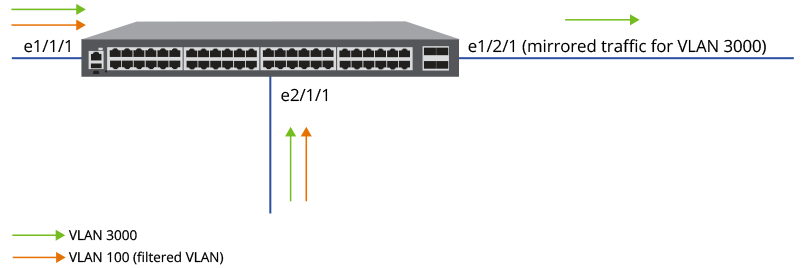
Complete the following steps to configure VLAN-based port mirroring for SPAN.
- Enter global configuration mode.
- Configure the mirror port.
- Configure the
required VLANs.
device(config)# vlan 3000 by port
device(config-vlan-3000)# tagged etherenet 2/1/1 ethernet 1/1/1
device(config-vlan-3000)# exit
device(config)# vlan 100
device(config-vlan-100)# tagged ethernet 2/1/1 ethernet 1/1/1
device(config-vlan-100)# exit
- Configure the
ports to be monitored.
device(config)# interface ethernet 1/1/1
device(config-if-e1000-1/1/1)# monitor ethernet 1/2/1 in
device(config-if-e1000-1/1/1)# exit
device(config)# monitor ethernet 2/1/1
device(config-if-e1000-2/1/1)# monitor ethernet 1/2/1 in
device(config-if-e1000-2/1/1)# exit
- Configure VLAN-based filtering for VLAN 100.
The following example creates mirror port 1/2/1, monitoring ports 1/1/1 and 2/1/1, and VLANs 3000 and 100. It then configures mirrored traffic from VLAN 100 to be filtered out so that only mirrored traffic from VLAN 3000 is sent from ports 1/1/1 and 2/1/1.
device# configure terminal
device(config)# mirror-port 1/2/1
device(config)# vlan 3000 by port
device(config-vlan-3000)# tagged etherenet 2/1/1 ethernet 1/1/1
device(config-vlan-3000)# exit
device(config)# vlan 100
device(config-vlan-100)# tagged ethernet 2/1/1 ethernet 1/1/1
device(config-vlan-100)# exit
device(config)# interface ethernet 1/1/1
device(config-if-e1000-1/1/1)# monitor ethernet 1/2/1 in
device(config-if-e1000-1/1/1)# exit
device(config)# monitor ethernet 2/1/1
device(config-if-e1000-2/1/1)# monitor ethernet 1/2/1 in
device(config-if-e1000-2/1/1)# exit
device(config)# mirror-filter source vlan 100