Viewing RADIUS Attribute Information
To view your currently configured RADIUS
attribute groups, go to Configuration >
Policies in the UI, and be sure to select the RADIUS Attribute Groups tab.
The following table shows you an example of what a RADIUS Attribute Groups table looks like after three different RADIUS attribute groups have been created.
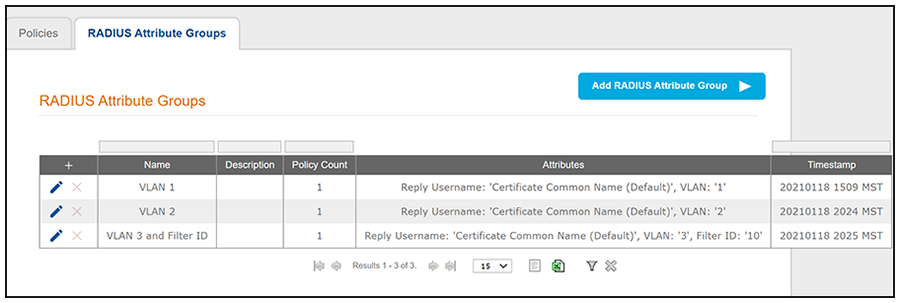
You can use the RADIUS Attribute Groups table as follows:
Description of RADIUS Attribute Groups Table
| Column Title | Description |
|---|---|
| + |
|
| Name | The name of the RADIUS attribute group as configured in the Display Name field in the RADIUS Attribute Group configuration screen, an example of which is shown in Create RADIUS Attribute Screen. |
| Description | Any optional description that was entered in the configuration of the RADIUS attribute group. |
| Policy Count | The number of policies that the RADIUS attribute group is currently assigned to. |
| Attributes | Lists all the attributes that were set for the corresponding
RADIUS attribute group name. For the "VLAN 1" attribute group name shown
in this example, the attribute "VLAN 1" is listed because that is the
only attribute that was set during the configuration of the VLAN 1
RADIUS attribute group name, as shown in Create RADIUS Attribute
Screen.
Note: The "Reply Username"
attribute applies only to certificate
authentications.
|
| Timestamp | Time that the RADIUS attribute group was created. |