Attaching the Rear Brackets to the Bracket Extensions at the Front of the Device
Complete the following steps to attach the rear brackets to the bracket extensions. There are short, medium, and long rear brackets that you can use for this step.
- Select the proper length rear bracket for your rack depth.
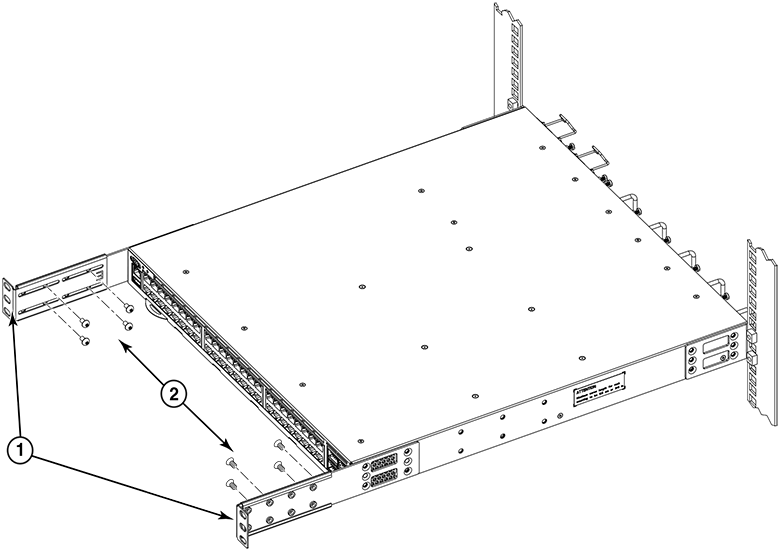
- Slide the right rear bracket onto the right extension, as shown in
Attaching the Short Rear Brackets to the
Extensions at the Front of the Device.
The short rear brackets are shown. Use the first and third vertical pairs of holes for the screws.
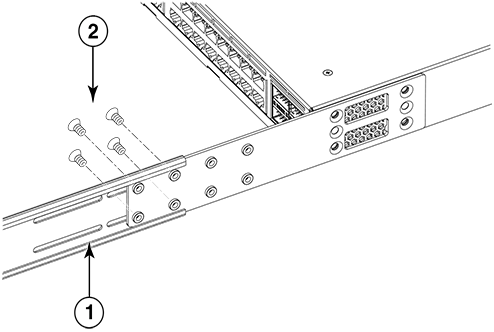
Refer to Attaching the Medium or Long Rear Brackets to the Extensions for the positioning of the medium or long brackets and screws.
- Attach the brackets using four 6-32 x 1/4-in. panhead screws.
- Repeat and to attach the left rear bracket to the left extension.
- Adjust the brackets to the rack depth and tighten all the 6-32 x 1/4-in. screws to a torque of 9 in-lb (10 cm-kg).