TACACS+

TACACS+ is an access control network protocol that provides separate authentication, authorization and accounting services.
Note: Authentication has four modes:
  • Only local (TACACS user cannot log in.)
  • Only TACACS (Except the Admin user who was created when the software was installed.)
  • First local then TACACS (Unleashed Multi-Site Manager will authenticate the user against the local database first and then against the TACACS server.)
  • First TACACS then local (Unleashed Multi-Site Manager will authenticate the user against the TACACS server first and then against the local database.) The Authentication Mode affects the user login process.
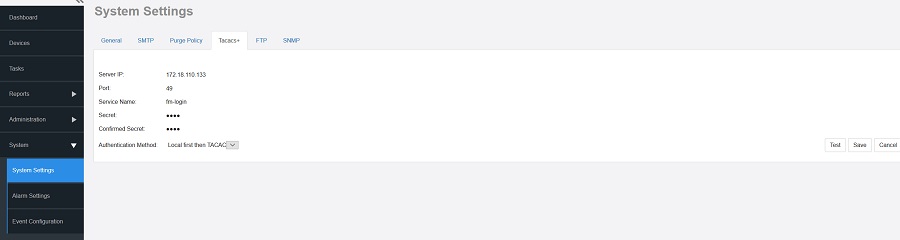
  1. Go to Administration > System Settings.
  2. ClickTacacs+ section.

    TACACS+ Settings

  3. Enter the TACACS+ parameters:
    • Server - IP or the host name of the TACACS server.
    • Port - The port number of the TACACS service, the default value is 49.
    • Service Name.
    • Secret.
    • Confirmed Secret.
  4. Click Test to verify that the software is able to use the TACACS+ settings that you configured.
    If an error appears, then check your settings and update them with the correct settings.
  5. Click Save.