Configuring ZoneDirector & 200.5 Unleashed Behind NAT Server
ZoneDirector and 200.5 Unleashed do not support SSH tunnels. Therefore for these
devices behind the NAT server, it is recommend to enable the Management Interface,
add one 443 port mapping on the NAT server and then configure the external port to
the
Unleashed Multi-Site Manager.
- Upload the Unleashed license as described in Uploading a License File.
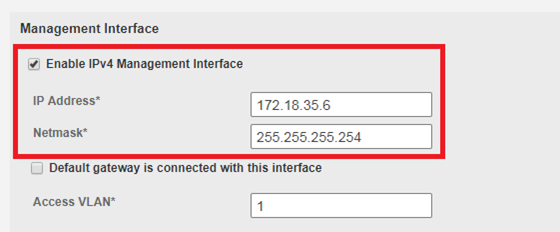
- Enable and configure the management interface according to your network from ZoneDirector web interface:
- Enable and configure the management interface according to your network from 200.5 Unleashed web interface:
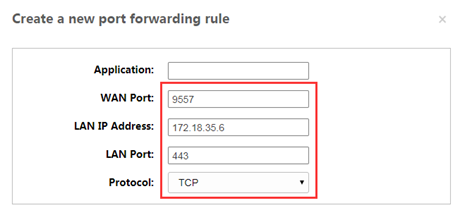
- Log in to the NAT server and map the LAN port to 443. Create a port forwarding rule: TCP: management IP: 443
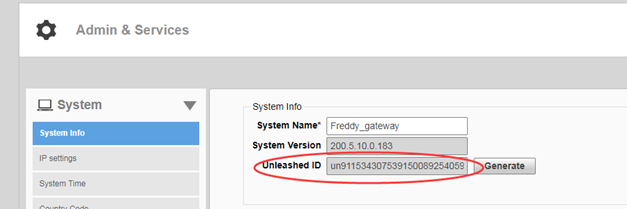
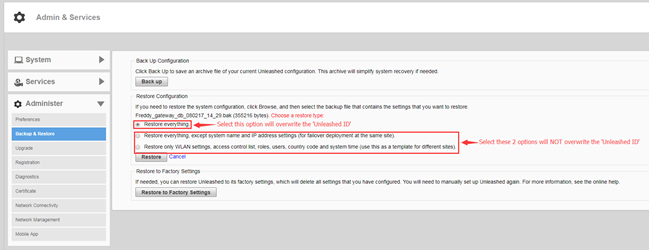
- Generate and Apply the Unleashed ID: Each unleashed network has an ID which is automatically generated by the system. You can renew this ID by clicking Generate from the Unleashed web interface and then apply it to the network. The 'Unleashed ID' is reset during set factory, and overwritten when the configuration is restored (when you choose the restore option as Restore everything). Unleashed Multi-Site Manager uses the 'Unleashed ID' to identify the unleashed network, and whenever the 'Unleashed ID' is renewed or reset, Unleashed Multi-Site Manager regards it as a new unleashed device.
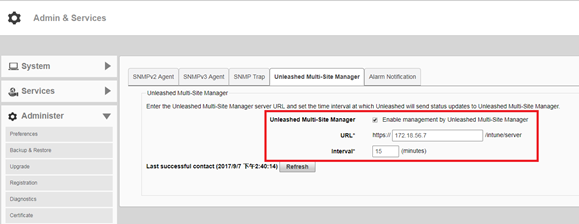
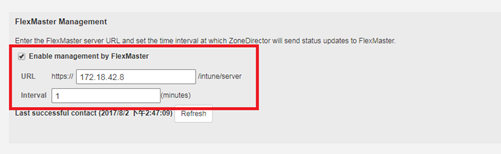
- Enable Unleashed Multi-Site Manager management from Unleashed web interface:
- Enable Unleashed Multi-Site Manager management from ZoneDirector web interface:
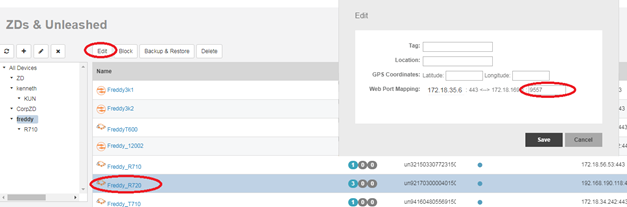
- In the Unleashed Multi-Site Manager web interface, go to Devices. Select the device which is behind the NAT server, and click Edit. Configure the values.
- Click Save. The external port which you configured in step 3 is submitted.