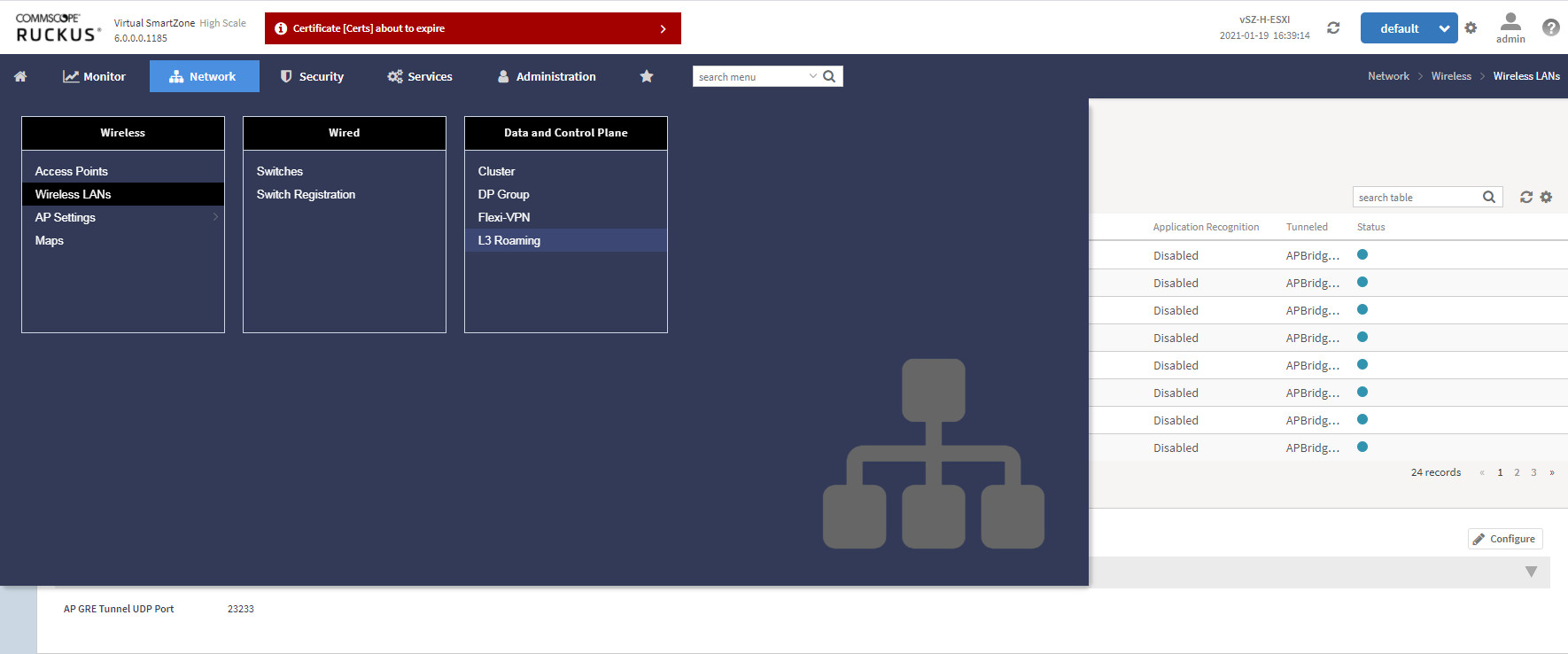
In the Network > Wireless> Wireless LANs page,
select the Zone where you want to create a WLAN.
Wireless LANs
Click
Create. The
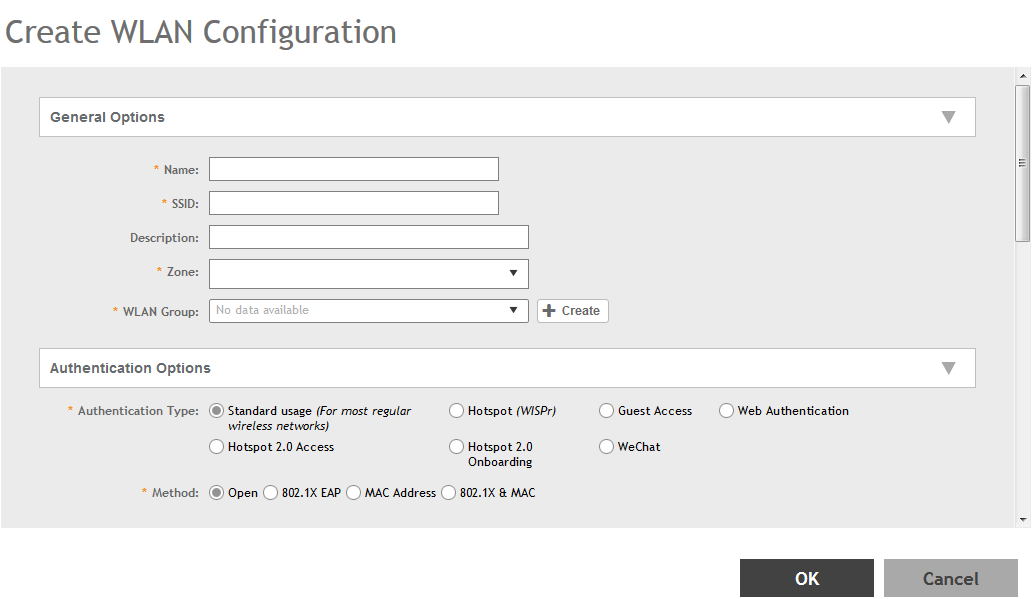
Create WLAN Configuration page is displayed.
Creating a WLAN Configuration
Set the required configurations as explained in the below table.
Click
OK.
WLAN Configurations
Field
Description
Your Action
General Options
Name
Indicates the user-friendly administrative name for the WLAN.
Enter a name.
SSID
Indicates the SSID for the WLAN.
Enter the SSID
Authentication Options
Authentication Type
Defines the type of authentication flow for the WLAN.
Note: Authentication types such as WeChat, Web Authentication and Guest Access are not supported
by APs in IPv6 mode.
Hotspot (WISPr)Click this option if want to use a hotspot service (use this type for external captive
portal workflows) or WISPr.
Note: Hotspot (WISPr) applies to WLAN traffic that is tunneled and not tunneled.
Authentication Options
Method
Specifies the authentication mechanism.
Open (Default)—No authentication mechanism is applied to connections. If WPA or WPA2 encryption
is used, this implies WPA-PSK authentication. Select the following option:
Defines hotspot ehavior such as redirects, session timers, and location information
among others.
Select the hotspot portal profile that you want this WLAN to use.
Bypass CNA
Bypasses the Apple CNA feature on iOS and OS X devices that connect to this WLAN.
Select the
Enable check box.
Authentication Service
Indicates the authentication server that you want to use for this WLAN.
Choose the option. Options include
Local DB,
Always Accept, and any AAA servers that you previously added. Select:
Use Controller as Proxy for the controller to proxy authentication messages to the AAA server
Use Realm-based profile to list contents from the realm-based profile.
Attention: This option is available only for SZ300 and vSZH platforms.
When the SSH tunnel between the AP and the controller is down, you can enable
Backup Authentication Service to back up the AP's authentication services to a secondary device.
Note: The customer portal must use AP WISPr ZD-Style API/Backup AAA to continue to provide
the WISPr service for WISPr survivability.
Accounting Service
Indicates the RADIUS Accounting server that you want to use for this WLAN.
Choose the option. You must have added a RADIUS Accounting server previously.
Additionally, if you want the controller to proxy accounting messages to the AAA server,
select the
Use the Controller as Proxy check box.
Select:
Use Controller as Proxy for the controller to proxy authentication messages to the AAA server
Use Realm-based profile to list contents form the realm-based profile. This option is available only for
SZ300 and vSZH platforms.
When the SSH tunnel between the AP and the controller is down, you can enable
Backup Accounting Service to back up the AP's accounting services to a secondary device.
Note: The customer portal must use AP WISPr ZD-Style API/Backup AAA to continue to provide
the WISPr service for WISPr survivability.
RADIUS Option
NAS ID
Defines the ID sent to the RADIUS server, which will identify the AP.
Choose the option:
WLAN BSSID
AP MAC
User-defined
NAS Request Timeout
Indicates the duration after which an expected RADIUS response message is considered
to have failed.
Enter the timeout period (in seconds).
Note: It is recommended to configure the same values for
NAS Request Timeout,
NAS Max Number of Retries, and
NAS Reconnect Primary.
NAS Max Number of Retries
Indicates the maximum number of failed connection attempts after which the controller
will fail over to the backup RADIUS server.
Enter the maximum number of failed connection attempts.
Note: It is recommended to configure the same values for
NAS Request Timeout,
NAS Max Number of Retries, and
NAS Reconnect Primary.
NAS Reconnect Primary
Indicates the time interval after which the controller will recheck if the primary
RADIUS server is available when the controller has failed over to the backup RADIUS
server.
Enter the duration in minutes.
Range: 1 through 60 minutes. The default interval is 5 minutes.
Note: It is recommended to configure the same values for
NAS Request Timeout,
NAS Max Number of Retries, and
NAS Reconnect Primary.
Called Station ID
Indicates the format for the called station ID, which is sent to the RADIUS server
as an attribute, and can be used in policy decisions.
Select a format:
WLAN BSSID
AP MAC
AP GROUP
NONE
Single Session ID Accounting
Allows the APs to maintain one accounting session for a client roaming between APs.
If the client roams from one AP to another, the accounting session ID and stats will
be carried while roaming from one AP to the other. If the feature is not enabled,
the accounting session ID is re-generated and stats is also reset, essentially resetting
the accounting session.