Creating Proxy AAA Servers for Standby Cluster
A proxy AAA server is used when APs send authentication/accounting messages to the
controller and the controller forwards these messages to an external AAA server.
- Go to .
- Select the Proxy (SZ Authenticator) tab, and then select the zone for which you want to create the AAA server.
- Click Create.
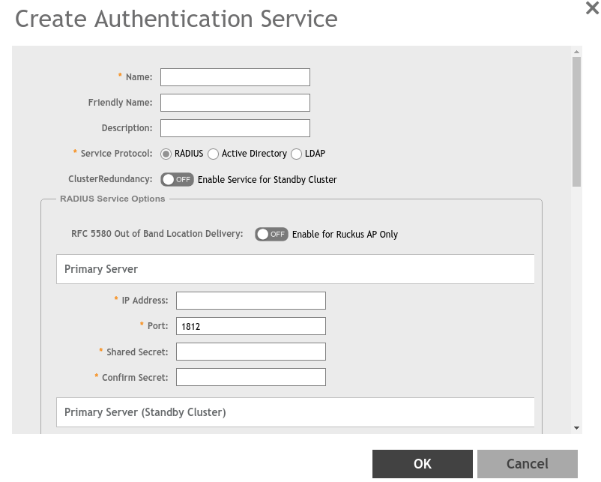
- Configure the following:
- Name: Type a name for the authentication service that you are adding.
- Friendly Name: Type an alternative name that is easy to remember.
- Description: Type a description for the authentication service.
- Service Protocol: If you select
- RADIUS, see RADIUS Service Options for more information.
- Active Directory, configure the following:
- Global Catalog: Select the Enable Global Catalog support if you the Active Directory server to provide a global list of all objects.
- Primary Server:
- IP Address: Type the IPv4 address of the AD server.
- Port: Type the port number of the AD server. The default port number (389) should not be changed unless you have configured the AD server to use a different port.
- Windows Domain Name: Type the Windows domain name assigned to the AD server (for example, domain.ruckuswireless.com).
- LDAP, configure the following:
- Select the
Enable TLS Encryption check box if you want to use the
Transport Layer Security (TLS) protocol to secure communication with the server.
Note: You must also configure the Trusted CA certificates to support TLS encryption.
- IP Address: Type the IPv4 address of the LDAP server.
- Port: Type the port number of the LDAP server.
- Base DN: Type the base DN in LDAP format for all user accounts (for example, dc=ldap,dc=com).
- Admin DN: Type the admin DN in LDAP format (for example, cn=Admin;dc=<Your Domain>,dc=com).
- Admin Password: Type the administrator password for the LDAP server.
- Confirm Password: Retype the administrator password to confirm.
- Key Attribute: Type a key attribute to denote users (for example, default: uid)
- Search Filter: Type a search filter (for example, objectClass=Person).
- Select the
Enable TLS Encryption check box if you want to use the
Transport Layer Security (TLS) protocol to secure communication with the server.
-
SZ 5.1 update (removed HLR and its references)5.0 UpdateCluster Redundancy: Click the Enable Service for Standby Cluster option to enable cluster redundancy.
- Advanced Options - Domain name: Type the whitelisted domain name that you want to add.
- User Traffic Profile Mapping: The mapped user profile is listed.
- Click OK.