PKI Support for IPsec
The Public Key Infrastructure (PKI) provides a security infrastructure for entities to ensure secured communication.
Each PKI peer holds a Digital Certificate which holds multiple attributes that ensure the entity can be trusted and can support secured communication.
PKI uses an asymmetric encryption algorithm; two different keys are used to encrypt and decrypt data. The key pair consists of a private key and a public key. The private key must be kept secret while the public key can be distributed. Data encrypted by one of the two keys can only be decrypted by the other. Data encrypted with a public key cannot be decrypted using a public key and vice versa. Users of a public key can be confident that the associated private key is owned by the correct remote subject.
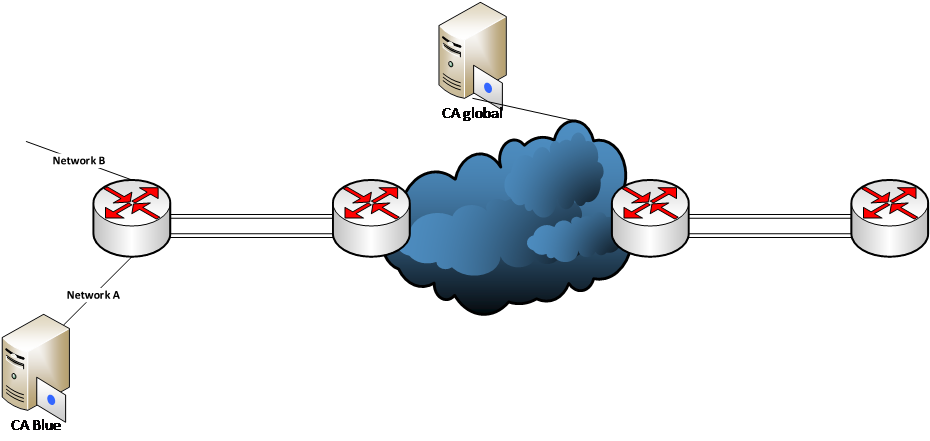
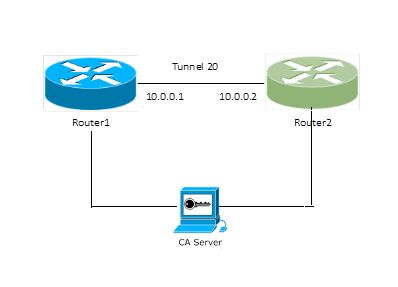
For authentication of the peers, digitally signed certificates can be used. You can create PKI entities for use in certificate authentication. To participate in certificate authentication with a Certificate Authority (CA), PKI entities must be enrolled. Entities can be enrolled through an automatic enrollment process, which allows them to send a certificate signing request (CSR) and to receive the required X.509 certificates from the CA in response. Entities can also be enrolled manually.
Configuring automatic enrollment of an entity (using SCEP) to the CA server involves the following tasks:
Generate a cryptographic key using either the EC (elliptical key pair) or the RSA key pair option for PKI.
Create a PKI entity.
Configure the PKI profile.
Configure the PKI trustpoint.
Authenticate the PKI trustpoint.
Enroll the entity to the PKI trustpoint.
Configuring PKI manual import of digital certificates involves the following components:
Root CA certificate, which will be used with the configured trustpoint on the TOE
The intermediate CA certificate
The local DUT certificate, which is signed by the Root CA or any intermediate CA of the Root CA
The key for the DUT local certificate
The listed certificates and keys must be copied into flash on the TOE.
Revocation Check for Peer Certificates Using CRL
A Certificate Revocation List (CRL) is a list of certificates signed by the CA that are prematurely invalid.
A periodic CRL timer runs, and each time it expires, it dumps the entire list of revocation information. The revocation check is performed when the CRL information is downloaded for the first time. When the subsequent timer expires, the revocation check is not performed unless the tunnels are forced to renegotiate.
The revocation-check crl command is used to set CRL as the revocation type.
device(config-pki-trustpoint-trust1)# revocation-check crl
The show pki crl command displays the downloaded revocation information.
device# show pki crl trustpoint_name
The clear pki crl command is used to clear the downloaded revocation information.
device(config)# clear pki crl trustpoint_name
The pki export crl command is used to export the CRL file of a given trustpoint. The following example
exports the CRL for the trustpoint trust1 to the file crl_file.
device(config)# pki export crl trust1 url crl_file
CRL Distribution Point
The CRL Distribution Point (CDP) is used to retrieve the latest CRL of a CA. The CDP is usually located on an LDAP server or HTTP (web) server and is normally expressed as an ldap://host/dir or http://host/path URL.
After the revocation list is validated by the CRL server and the certificate is valid, then the IPsec session will come up between peers.
If the CRL server is not reachable and the response is not received during the IPsec tunnel bringup time, then the IPsec session does not come up between the peers.
Note: If for some reason the CRL server is not reachable, the IPsec peers will not check the revocation list until any of the IPsec peers reload or the IPsec session is cleared.
Configurations for PKI Trustpoint Using Revocation Check Using CRL
device# configure terminal
device(config)# pki trustpoint abcd
device(config-pki-trustpoint-abcd)# revocation-check crl
device(config-pki-trustpoint-abcd)# crl-query http://10.177.148.229/CertEnroll/FISQA-WIN12-01-CA-4.crl
device(config-pki-trustpoint-abcd)# fingerprint 3C:EA:EC:E6:F1:DD:3B:86:65:DE:58:F4:A2:75:D8:63:6D:23:68:40
device(config-pki-trustpoint-abcd)# exit
Revocation Check for Peer Certificates
FastIron devices support OCSP for checking the revocation status of a certificate received from a peer. The revocation status is checked for both the intermediate and the peer certificate. The following actions are taken in revocation checks:
The OCSP signing bit should be set for the OCSP responder.
If the OCSP responder responds that the certificate status is good, the IPsec session comes up.
If the OCSP responder responds that the certificate status is revoked, the IPsec session does not come up.
If the OCSP server is not reachable and the response is not received, then the IPsec session does not come up between the peers.
Configurations for Manual Enrollment
device# configure terminal
device(config)# crypto key generate rsa
device(config)# pki import key rsa rsakey pem url flash: dut.key.pem
device(config)# pki import abcd pem url flash: rootca.pem
device(config)# pki import abcd pem url flash: localcert.pem

device(config)# pki trustpoint abcd
device(config-pki-trustpoint-abcd)# ocsp http post
device(config-pki-trustpoint-abcd)# revocation-check ocsp
device(config-pki-trustpoint-abcd)# ocsp-url http://10.21.40.39:2560
device(config-pki-trustpoint-abcd)# fingerprint 3C:EA:EC:E6:F1:DD:3B:86:65:DE:58:F4:A2:75:D8:63:6D:23:68:40
device(config-pki-trustpoint-abcd)# exit

device(config)# pki authenticate abcd
device(config)# pki cert-validate abcd
PKI: Successfully validated the local certificate for trustpoint: abcd
Configurations for Automatic Enrollment
device(config)# pki entity entity1
device(config-pki-entity-entity1)# common-name "tester1"
device(config-pki-entity-entity1)# country-name "IN"
device(config-pki-entity-entity1)# state-name "KA"
device(config-pki-entity-entity1)# org-unit-name "FI"
device(config-pki-entity-entity1)# org-name "BRCD"

device(config)# pki profile-enrollment profile1
device(config-pki-profile-enrollment-profile1)# authentication-url http://WINN6C3R0LUDAJ.
englab.ruckus.com/CertSrv/mscep/mscep.dll
device(config-pki-profile-enrollment-profile1)# authentication-command WINN6C3R0LUDAJ.
englab.ruckus.com_englab-WIN-N6C3R0LUDAJ-CA-15
device(config-pki-profile-enrollment-profile1)# enrollment-url http://WINN6C3R0LUDAJ.
englab.ruckus.com/CertSrv/mscep/mscep.dll
device(config-pki-profile-enrollment-profile1)# password DB6E1F091AEF0244
device(config-pki-profile-enrollment-profile1)# exit

device(config)# pki trustpoint trust1
device(config-pki-trustpoint-trust1)# auto-enroll
device(config-pki-trustpoint-trust1)# enrollment retry-period 2
device(config-pki-trustpoint-trust1)# enrollment profile profile1
device(config-pki-trustpoint-trust1)# pki-entity entity1
device(config-pki-trustpoint-trust1)# eckeypair key-label eckeyAuto
device(config-pki-trustpoint-trust1)# fingerprint 36:0c:92:6e:df:b2:72:eb:59:e8:63:73:2a:98:a8:91:cb:50:94:d9
device(config-pki-trustpoint-trust1)# revocation-check ocsp
device(config-pki-trustpoint-trust1)# ocsp-url http://10.21.40.39:2560
device(config-pki-trustpoint-trust1)# fingerprint 3C:EA:EC:E6:F1:DD:3B:
device(config)# pki authenticate trust1
device(config)# pki enroll trust1
IKE Configuration with PKI
device(config)# ikev2 auth-proposal withCert
device(config-ike-auth-proposal-withCert)# method remote rsa
device(config-ike-auth-proposal-withCert)# method local rsa
device(config-ike-auth-proposal-withCert)# pki-trustpoint abcd-CA sign
device(config-ike-auth-proposal-withCert)# pki-trustpoint abcd-CA verify
device(config-ike-auth-proposal-withCert)# exit
!
device(config)# ikev2 profile with_standalone
device(config-ike-profile-with_standalone)# authentication withCert
device(config-ike-profile-with_standalone)# local-identifier dn "CN=SPATHA_STANDALONE, ST=CA, C=US,
O=SPATHA_SPATHA_ORG_NAME, OU=SPATHA_ALONE_ORG_UNIT"
device(config-ike-profile-with_standalone)# remote-identifier dn "CN=SPATHA48F, ST=CA, C=US,
O=SPATHA48F_ORG_NAME"
device(config-ike-profile-with_standalone)# match-identity local dn "CN=SPATHA_STANDALONE, ST=CA, C=US,
O=SPATHA_SPATHA_ORG_NAME, OU=SPATHA_ALONE_ORG_UNIT"
device(config-ike-profile-with_standalone)# match-identity remote dn "CN=SPATHA48F, ST=CA, C=US,
O=SPATHA48F_ORG_NAME"
device(config-ike-profile-with_standalone)# exit
!
device(config)# ipsec profile withKey-L2
device(config-ipsec-profile-withKey-L2)# ike-profile withKey-L2
device(config-ipsec-profile-withKey-L2)# exit
!
device(config)# ipsec profile withCert
device(config-ipsec-profile-withCert)# ike-profile with_standalone
IPsec Tunnel Configuration
device(config)# interface tunnel 1
device(config-tnif-1)# tunnel mode ipsec ipv4
device(config-tnif-1)# tunnel protection ipsec profile withCert
device(config-tnif-1)# tunnel source 10.1.1.1
device(config-tnif-1)# tunnel destination 10.1.1.2
device(config-tnif-1)# ip address 10.0.0.1 255.255.255.0
Show Commands
device# show pki certificates local
----------------PKI LOCAL CERTIFICATE ENTRY-----------------
CA: TLS-ABCD
Certificate:
Data:
Version: 3 (0x2)
Serial Number: 4125 (0x101d)
Signature Algorithm: sha256WithRSAEncryption
Issuer: C=US, ST=CA, L=SJ, O=ROOTCA-CC, OU=SQA, CN=ROOTCA-CC/emailAddress=user@arris.com
Validity
Not Before: Nov 7 02:24:18 2017 GMT
Not After : Nov 17 02:24:18 2018 GMT
Subject: CN=DUTFIPSCC, ST=CA, C=US/emailAddress=user@arris.com, O=DUTFIPSCC, OU=SQA
device#
device# show pki certificates trustpoint
----------------PKI TRUSTPOINT CERTIFICATE ENTRY-----------------
CA: TLS-ABCD
Certificate:
Data:
Version: 3 (0x2)
Serial Number:
bd:fa:4f:da:bd:89:4a:5d
Signature Algorithm: sha256WithRSAEncryption
Issuer: C=US, ST=CA, L=SJ, O=ROOTCA-CC, OU=SQA, CN=ROOTCA-CC/emailAddress=user@arris.com
Validity
Not Before: Nov 7 02:10:00 2017 GMT
Not After : Nov 7 02:10:00 2022 GMT
Subject: C=US, ST=CA, L=SJ, O=ROOTCA-CC, OU=SQA, CN=ROOTCA-CC/emailAddress=user@arris.com

device(config-tnif-1)# show ike certificate
Trustpoint: trustRSA
Local:
Certificate:
    Data:
        Version: 3 (0x2)
        Serial Number: 4100 (0x1004)
    Signature Algorithm: sha256WithRSAEncryption
        Issuer: C=IN/ST=KA/L=Bangalore/O=Ruckus Arris/OU=NEBU/CN=ROOT RSA
        Validity
            Not Before: Feb 23 16:19:43 2018 GMT
            Not After : Feb 21 16:19:43 2028 GMT
        Subject: CN=ICX RSA/ST=KA/C=IN/O=NEBU/OU=Ruckus Arris
CA:
Certificate:
    Data:
        Version: 3 (0x2)
        Serial Number:
            e2:11:82:3f:37:c2:6f:c0
    Signature Algorithm: sha256WithRSAEncryption
        Issuer: C=IN/ST=KA/L=Bangalore/O=Ruckus Arris/OU=NEBU/CN=ROOT RSA
        Validity
            Not Before: Feb 23 05:38:11 2018 GMT
            Not After : Feb 23 05:38:11 2023 GMT
        Subject: C=IN/ST=KA/L=Bangalore/O=Ruckus Arris/OU=NEBU/CN=ROOT RSA
Peer Certificates:
Cert Verified: True
Certificate:
    Data:
        Version: 3 (0x2)
        Serial Number: 4101 (0x1005)
    Signature Algorithm: sha256WithRSAEncryption
        Issuer: CN=Intermediate CA RSA/ST=KA/C=IN/O=Ruckus Arris/OU=NEBU
        Validity
            Not Before: Feb 23 16:22:11 2018 GMT
            Not After : Feb 21 16:22:11 2028 GMT
        Subject: CN=Linux RSA/ST=KA/C=IN/O=Ruckus Arris/OU=NEBU
Peer CAs:
Certificate:
    Data:
        Version: 3 (0x2)
        Serial Number: 4098 (0x1002)
    Signature Algorithm: sha256WithRSAEncryption
        Issuer: C=IN/ST=KA/L=Bangalore/O=Ruckus Arris/OU=NEBU/CN=ROOT RSA
        Validity
            Not Before: Feb 23 12:13:26 2018 GMT
            Not After : Feb 21 12:13:26 2028 GMT
        Subject: CN=Intermediate CA RSA/ST=KA/C=IN/O=Ruckus Arris/OU=NEBU
device#