DHCP Auto-Provisioning Enhancements
When DHCP auto-provisioning enhancements are configured for option 67, the application image type (router or switch) and the flash image location (primary or secondary) can be configured as part of option 67 along with the file name. This means that you can decide the image type and the flash memory location to which the DHCP client should be upgraded. The DHCP client then upgrades to a specific image type and flash location as received by option 67 from the server.
When option 67 is received from the server, the DHCP client triggers DHCP auto-provisioning based on the image type and flash location specified in option 67. If a specified image type and flash location is not received from the server, the DHCP client behaves according to the default settings.
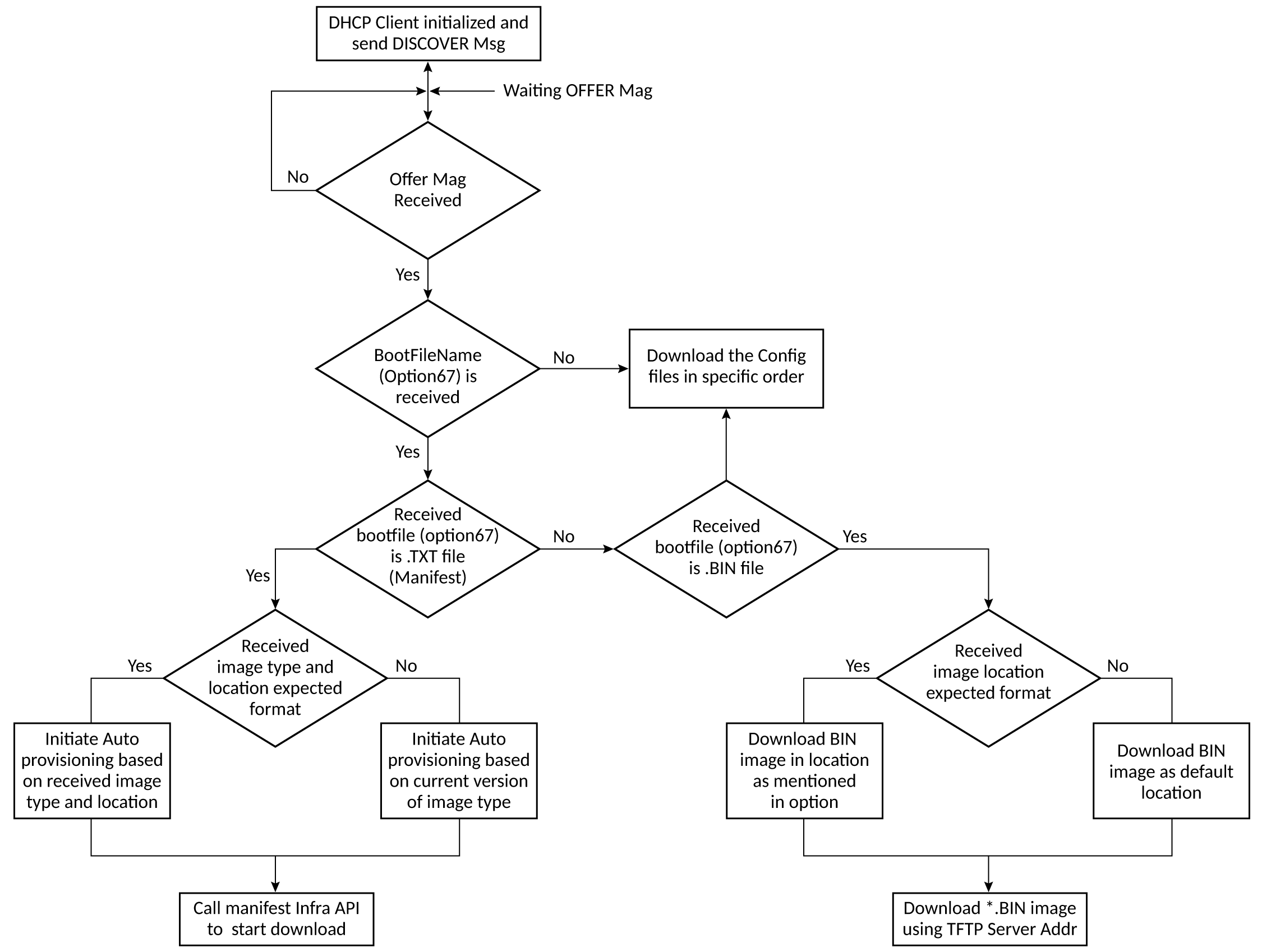
DHCP auto-provisioning enhancements allow option 67 to be configured with up to three ASCII strings, separated by a space, where each ASCII string configures a specific operation. The example below configures the “fi8080_manifest.txt” boot image, router as the image type, and the flash image as primary.
device(config-dhcp-GenericOption)# option bootfile-name "fi8080_manifest.txt router primary"
The example below configures the “fi8080_manifest.txt” boot image, router as the image type, and the flash image as secondary.
device(config-dhcp-GenericOption)# option bootfile-name "fi8080_manifest.txt router secondary"
The example below configures the “fi8080_manifest.txt” boot image, switch as the image type, and the flash image as secondary.
device(config-dhcp-GenericOption)# option bootfile-name "fi8080_manifest.txt switch secondary"
The example below configures the “fi8080_manifest.txt” boot image, switch as the image type, and the flash image as primary.
device(config-dhcp-GenericOption)# option 67 "fi8080_manifest.txt switch primary"
For information on configuration notes and feature limitations for DHCP auto-provisioning, refer to Configuration notes and feature limitations for DHCP client-based auto-configuration.