Requirements for Setting Up Cross-Realm Trusts
PEAP Authentication is supported across
realms that have been set up to trust each other, as the following illustration
depicts.
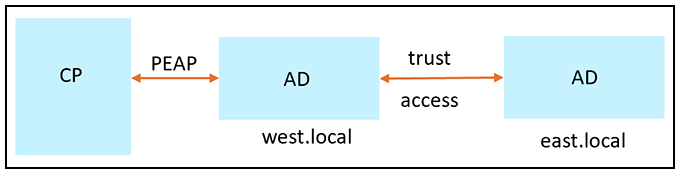
Follow these guidelines, which use the environment depicted in the illustation as an example, to use PEAP authentication for trusted realms:
- Set up west.local and east.local to trust each other.
- Choose only one domain as the Cloupath PEAP domain for Cloudpath to join; for example west.local. Cloudpath will be able to authenticate all identities on west.local and its trusted domain east.local
- You do not need to add the east.local domain controller to Cloudpath.
- Verifications for readiness to join west.local should be conducted on the west.local domain controller only.
- LDAP user authentication tests in the Configuration > Authentication Servers of the Cloudpath UI works only for test users in the west.local domain.
- Users on the PEAP default domain (west.local in this example) can be authenticated without specifying the domain name (for example, a user called john can be authenticated using only the name john as well as john@west.local or WEST\john).
- Users on the trusted domain (east.local in this example) must be authenticated with the domain name specified (for example: EAST\bob or bob@east.local).
- Cloudpath can retrieve user groups for identities on the trusted domains. Therefore, group policies can be applied to the trusted domains.