To display the list of MAC addresses that have been learned by the device, click
Monitor on the left pane and select
MAC Address.
The
MAC Address
window is displayed as shown in the figure below.
Monitoring the MAC address
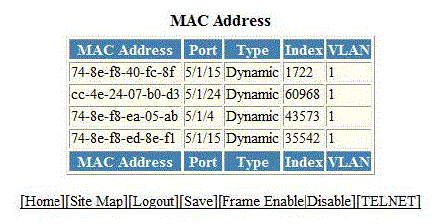
The table below describes the fields in the
MAC Address
window.
Description of the fields in the
MAC Address window
|
Field
|
Description
|
|
MAC Address
|
Displays the MAC address of the device.
|
|
Port
|
Displays the port attached to the device for which the entry was made. For dynamic
entries, this is the port on which the entry was learned.
|
|
Type
|
Displays the type of the entry, which can be one of the following:
-
Dynamic—The MAC address changes if the Active Controller changes.
-
Static—The MAC address will not change if the Active Controller changes.
|
|
Index
|
Displays the index of the entry in the MAC address table.
|
|
VLAN
|
Displays the port-based VLAN that contains this (instance of) spanning tree. VLAN
1 is the default VLAN. If you have not configured port-based VLANs on this device,
all STP information is for VLAN 1.
|