Insights Marketplace
The RUCKUS IoT Insights Marketplace is a collection of tools, data connectors, and applications software that provide enablement and configuration of core IoT Insights operations. These fundamental tools include the connection to the RUCKUS IoT Controller, MQTT broker online upgrade, and third-party support service configuration.
Insights Marketplace applications are divided into different (color-coded) categories:
- Connectivity (orange)
- Logic (purple)
- Partner (green)
- Video (Blue)
- Services (yellow)
- Solutions (Light Blue)
All installed applications are identified by a green check mark on them and are listed with their respective version numbers in the Installed Services table.
For basic operation and successful configuration, Insights must have the have the following two Marketplace applications installed and configured:
These two services are needed to connect the Insights platform to the IoT Controller for management discovery and data transfer. Without these two services and without correct configuration, Insights will not provide any basic functionality because the system will be unable to authenticate and verify licensing and entitlement for the system.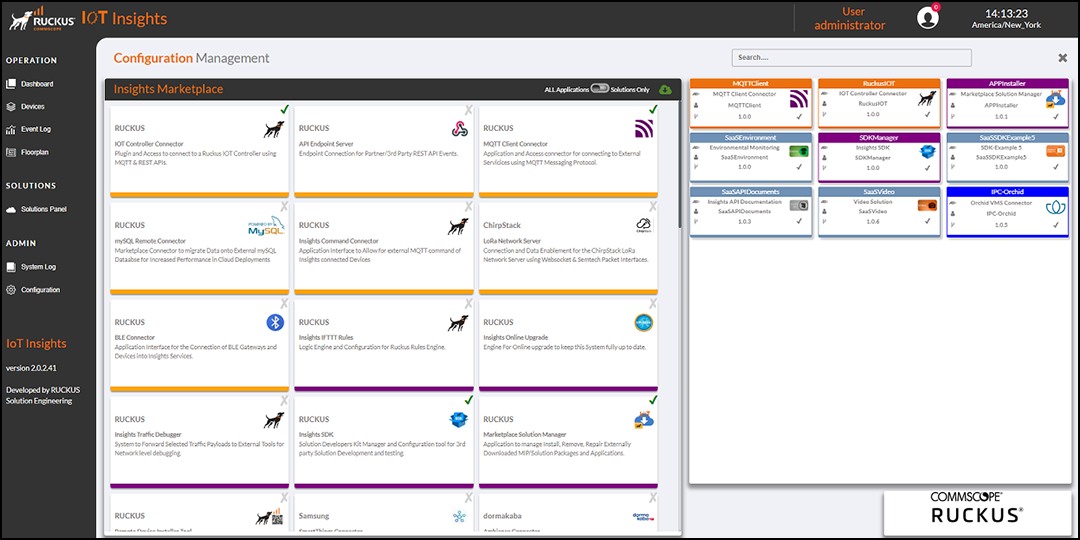
The Installed Services table lists the Insights Marketplace above the applications allows you to display all applications or solution-based applications only.
You can enter search criteria in the Search field to search the Installed Services table for information.