Performing an Online Upgrade
When a new firmware version is available
and your Unleashed Master AP is able to connect to the RUCKUS firmware server and
detect a
newer version than what is currently running, it displays the recommended version
(or
multiple versions) in the firmware upgrade section firmware list under "Online Upgrade."
- Select tab.
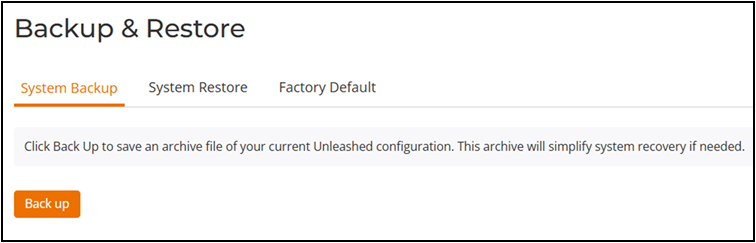
- Click Back up to back up your existing configuration.
- Save the backup file to a convenient location on your local computer.
- Select .
- In the Online
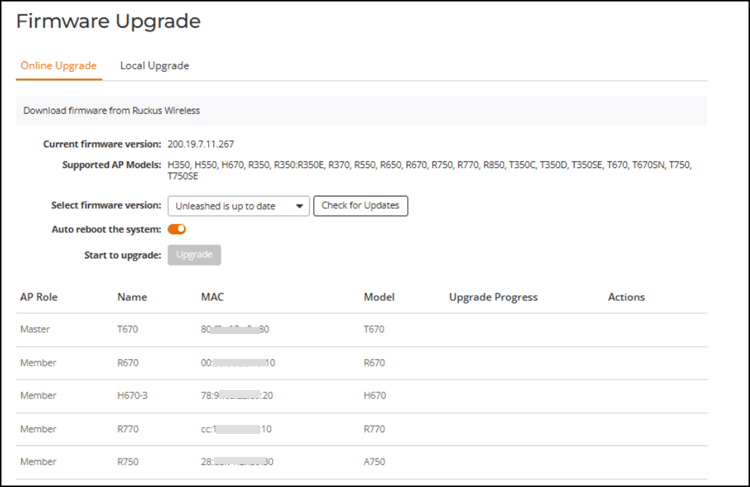
Upgrade tab, for Select firmware version,
complete the following steps:
- If Unleashed is up to date is displayed, click Check for Updates to attempt to locate a newer firmware version from the RUCKUS website. If no newer version is available, the list will continue displaying Unleashed is up to date and no other options will appear.
- If a newer firmware version is available in the Select firmware version drop-down list, select the firmware version to download from the RUCKUS website from the drop-down list.
Note: You can roll back to the previous image version and restore the configuration of the previous version. The rollback syncs automatically to all member APs. If the old Master AP reboot fails and a member AP becomes the Master AP, then the new Master AP can still roll back to the previous version with the corresponding configuration. - (Optional) Select Auto reboot the system to
automatically reboot each AP after the firmware has been deployed to the AP.
By
default, this option is enabled. You may want to disable this option if you
prefer to wait until all APs have the new firmware before rebooting them all
at
once.If you have multiple Unleashed AP models that require different firmware image files, you can either:
- Select the Auto reboot the system option and wait until all the APs have finished downloading the firmware and the entire RUCKUS Unleashed network is automatically rebooted.
- You could choose to wait until all the APs have finished downloading the firmware and click Reboot to reboot the entire RUCKUS Unleashed network.
- Click Upgrade.